
Solutions :
Python Quiz | Day 74 | What is the output of following Python code ?
— Python Coding (@clcoding) April 16, 2023
Complete Playlist : https://t.co/ExeeauixjT pic.twitter.com/dCPJruiBjc

Solutions :
Python Quiz | Day 74 | What is the output of following Python code ?
— Python Coding (@clcoding) April 16, 2023
Complete Playlist : https://t.co/ExeeauixjT pic.twitter.com/dCPJruiBjc

Python Quiz | Day 75 | What is the output of following Python code ? Complete Playlist : https://t.co/ExeeauixjT pic.twitter.com/z4gfILNxYQ
— Python Coding (@clcoding) April 21, 2023
Object-oriented programming (OOP) is a programming paradigm that is based on the concept of "objects," which can contain data and code to manipulate that data. Python is an object-oriented programming language that supports OOP concepts such as inheritance, encapsulation, and polymorphism. Here are some key concepts and syntax used in Python for OOP:
Class: A class is a blueprint or template for creating objects. It defines a set of attributes and methods that the objects of that class will have.
Syntax:
class ClassName:
# class attributes
attribute1 = value1
attribute2 = value2
# class methods
def method1(self):
# method code
def method2(self):
# method code
@staticmethod: This decorator is used to define a static method in a class. A static method is a method that can be called on the class itself rather than on an instance of the class. Here's an example:
class MyClass:
@staticmethod
def my_static_method():
print("This is a static method")
@classmethod: This decorator is used to define a class method in a class. A class method is a method that takes the class itself as its first argument rather than an instance of the class. Here's an example:
class MyClass:
class_var = "Hello"
@classmethod
def my_class_method(cls):
print(cls.class_var)
@property: This decorator is used to define a method as a property of a class. Properties allow you to access and set the value of an attribute of an instance of the class without explicitly calling a getter or setter method. Here's an example:
class MyClass:
def __init__(self):
self._x = 0
@property
def x(self):
return self._x
@x.setter
def x(self, value):
if value < 0:
raise ValueError("Value must be non-negative")
self._x = value
@log_calls: This decorator can be used to log all calls to a function. Here's an example:
def log_calls(func):
def wrapper(*args, **kwargs):
print(f"Calling {func.__name__} with args: {args}, kwargs: {kwargs}")
result = func(*args, **kwargs)
print(f"Finished {func.__name__}")
return result
return wrapper
@log_calls
def my_function(x, y):
return x + y
@cache: This decorator can be used to cache the results of a function so that the function doesn't need to be called again with the same arguments. Here's an example:
def cache(func):
results = {}
def wrapper(*args):
if args in results:
return results[args]
result = func(*args)
results[args] = result
return result
return wrapper
@cache
def fibonacci(n):
if n < 2:
return n
return fibonacci(n-1) + fibonacci(n-2)
Walrus operator (:=): This operator allows you to assign and return a value in the same expression. It can be particularly useful in list comprehensions or other situations where you need to assign a value to a variable and use it in a subsequent expression. Here's an example:
if (n := len(my_list)) > 10:
print(f"List is too long ({n} elements, expected <= 10)")
In this we are going to make a Log_In form in which login filling options will be in a transparent box. And you can add your own background image also.
Note*:- TO change the background go inside the style tag. Inside style tag go to the body and in background-image change the address of the url , give the address of the image which you want to keep in your background. Now,your image will be display on background.
CODE:-
<!DOCTYPE html>
<html lang="en">
<head>
<meta charset="UTF-8">
<meta http-equiv="X-UA-Compatible" content="IE=edge">
<meta name="viewport" content="width=device-width, initial-scale=1.0">
<title>LOG_IN_FORM</title>
<style>
body{
background-image: url('/images/flower.jpg');
background-position-x: center;
background-size: cover;
}
.container{
text-align: center;
padding: 28px ;
margin-left: 30%;
margin-right: 30%;
background-color: rgb(238, 192, 234);
border-radius: 20px;
display: block;
box-shadow: 0 15px 20px rgba(0,0,0,.2);
opacity: 0.8;
}
.txt{
background-color: rgba(223, 210, 227, 0.9);
border-radius: 25px;
opacity: 0.9;
margin-left: 30%;
margin-right: 30%;
text-align: center;
font-family:cursive;
font-size:xx-large;
}
input[type=text] , input[type=password]
{
width: 350px;
margin: 8px 0;
padding: 12px 20px;
display: inline-block ;
border: 2px solid skyblue;
border-radius: 9px;
box-sizing: border-box ;
}
button{
background-color: #c120ac;
width: 30%;
border-radius: 20px;
color: black;
padding: 15px;
margin: 10px 0px;
border: none;
cursor: pointer;
}
button:hover{
opacity: 0.7;
}
</style>
</head>
<body>
<h2 class="txt">
LOG IN
</h2>
<form action="login.php">
<div class="container">
<label>Username</label> <br>
<input type="text" name="username" placeholder="Enter Your Username" required> <br>
<label >Password</label> <br>
<input type="password" name="password" placeholder="Enter Your Password" required> <br>
<button type="submit">LOG IN</button>
<button type="reset">SIGN UP</button> <br>
<a href="#">Foget Password?</a>
</div>
</form>
</body>
</html>
OUTPUT:-The image in background is what I have selected in background you can choose your own it will be displayed like this only and you can change the colour of the box also inside the style tag in .txt and .container.

In this we are going to add three types of hover button styles which will make your buttons very innovative and attractive.
1.Border Pop
2.Background Slide
3.Background Circle
Code:-
<!DOCTYPE html>
<html lang="en">
<head>
<meta charset="UTF-8">
<meta http-equiv="X-UA-Compatible" content="IE=edge">
<meta name="viewport" content="width=device-width, initial-scale=1.0">
<title>Fancy Buttons</title>
<style>
* ,*::before ,*::after{
box-sizing: border-box;
}
body{
display: flex;
justify-content: center;
align-items: center;
flex-wrap: wrap;
margin: 0;
}
button{
margin: 1rem;
}
.btn{
background-color: var(--background-color);
color: #222;
padding: .5em 1em;
border: none;
outline: none;
position: relative;
cursor: pointer;
--background-color: #E3E3E3;
--border-size:2px;
--accent-color: #0af;
}
.btn.btn-border-pop::before{
content: "";
position: absolute;
top: 0;
left: 0;
right: 0;
bottom:0;
z-index: -1;
border: var(--border-size) solid var(--background-color);
transition: top,left,right,bottom,100ms ease-in-out;
}
.btn.btn-border-pop:hover::before,
.btn.btn-border-pop:focus::before{
top: calc(var(--border-size)* -2);
left: calc(var(--border-size)* -2);
right: calc(var(--border-size)* -2);
bottom: calc(var(--border-size)* -2);
}
.btn.btn-background-slide::before{
content: "";
position: absolute;
top: 0;
left: 0;
right: 0;
bottom: 0;
background-color: var(--accent-color);
z-index: -1;
transition: transform 300ms ease-in-out;
transform: scale(0);
transform-origin: left;
}
.btn.btn-background-slide:hover::before,
.btn.btn-background-slide:focus::before{
transform: scale(1);
}
.btn.btn-background-slide{
z-index: 1;
transition: color 300ms ease-in-out;
}
.btn.btn-background-slide:hover,
.btn.btn-background-slide:focus{
color: white;
}
.btn.btn-background-circle::before{
content: "";
position: absolute;
top: 0;
left:0;
right:0;
bottom: 0;
z-index: -1;
background-color: var(--background-color);
border-radius: 50%;
transition: transform 500ms ease-in-out;
transform: scale(1.5);
}
.btn.btn-background-circle:hover::before,
.btn.btn-background-circle:focus::before{
transform:scale(0);
}
.btn.btn-background-circle{
z-index:1;
overflow: hidden;
background-color: black;
transition: color 500ms ease-in-out;
}
.btn.btn-background-circle:hover,
.btn.btn-background-circle:focus{
color: white;
}
.btn.btn-border-underline::before {
content: "";
color: brown;
position: absolute;
left: 0;
right: 0;
bottom: 0;
height: var(--border-size);
background-color: var(--accent-color);
transform: scaleX(0);
}
</style>
</head>
<body>
<button class="btn btn-border-pop">Border Pop</button>
<button class="btn btn-background-slide">Background Slide</button>
<button class="btn btn-background-circle">Background Circle</button>
</body>
</html>
Output:-
Python Quiz | Day 40 | What is the output of following code ?
Complete Playlist : https://bit.ly/3GLnZPy
.png)
.png)
Python Quiz | Day 37 | What is the output of following code ?
Complete Playlist : https://bit.ly/3GLnZPy
.png)
Complete Playlist : https://bit.ly/3GLnZPy
Solution:
Answer: D. Explanation:
The list.pop method removes an element from the list, and returns the removed element.
When used without arguments, pop removes and returns the last element of the list.
When an argument index is specified,
Python is a great language to learn, but it can be hard to pick up if you’ve never programmed before. A lot of the syntax and functions are pretty weird when compared to other languages like JavaScript, Ruby or Java. Luckily, Python has some helpful built-in functions that make it easier for beginners to get started learning programming. In this blog post we will take a look at some of these functions and how they can help us become more efficient programmers in our daily lives!
The following Python code is an example of lazy operators. This section shows how to use them in your own programs, but we will first use the examples provided by the python documentation:
print(all([])) - returns all items from a list (or other iterable), without necessarily creating any copies. It's like calling len() on a list and then getting its length.
print(any([])) - returns true if at least one item in a list satisfies some condition . For example, if you want to know whether there are any numbers greater than 10 inside [10], then it would be easier just to test each number one by one rather than doing this whole loop thingy....
You can use the all() function to print all of the elements in a list. For example, this will print all numbers in the range:
print(all([1, 2, 3]))
If you want to print only one element from the list, you can use an index:
print(all(1))
print(any([]))
The first line of code is the same as above, but in Python it looks for a false element. The algorithm looks for the first occurrence of a true element and, if none were found, returns False. Since the sequence is empty, there are no elements that can be true so this runs through and prints False
The first thing that you need to know about lazy operators is that they are lazy. This means that when we use them, we can only get the result at a later time. Here's an example:
```python
print(all([]))
print(any([]))
```The first two lines print out all elements in their operands but do not return any values, because there are no true cases present in those expressions yet. If you were expecting a set or list of tuples as an answer from these expressions and wanted to see if an element existed before returning false, then it would work just fine with these operators -- but what if I told you there was another way?
"""Function all() is a little complicated, but you already know how it works.
It accepts one argument and returns a list containing the items in the reversed order. This can be useful for doing things like summing up numbers or sorting them by value. It's also useful for making sure that only unique values are present in your data structures (e.g., if you have an array of dictionaries and one of them contains duplicate keys).
The problem with this function is that it requires more memory than necessary because we don't need to keep track of what order our results will be returned in; they'll always be sorted automatically by Python when they come back from our function call! That means there's no reason not removing those extra elements from both sides before feeding them into any other operation such as filter().
Since it represents the concept of vacuous truth, the all() function returns True if all elements are true. The any() function returns True if any element is true.
If you're looking for the first non-false element, then all([]), like lazy operators, is a function that returns True when provided with any other value.
However, since there are no false elements in an empty sequence (and since Python doesn't have built-in logic to check for nulls), print(all([])) prints True:
print([])
The algorithm is to look for the first false element and, if none were found, return True. If any element of the iterable is true, then return True.
The following code snippet demonstrates how this works in Python:
The if statement is one of the most useful features in Python. It allows you to check whether or not an element is true, and if none were found then return True.
The following code:
if x > 0 and y < 10:
yields this output: True
Since there are no false elements in an empty sequence, print(all([])) prints True.
However, there is another way to achieve this effect: we can simply use the bool() function! The boolean value of x is true if x is equal to true or false (or any other value that Python determines as being truthy). Using this check for equality will return a boolean result when called on a list containing only one element.
The function any() is the opposite of all(). It will return True if any element in the iterable is true.
If we pass an empty list, no elements will be returned by this function.
For example:
```python print(["Hello", "World"]) # [1] print([]).any() # True```
The first thing that you need to know about lazy operators in Python is that they are the ones that evaluate only when necessary.
The example above shows how logical operators work: the first one to be evaluated is any(), which evaluates to True and then all() evaluates to True, since there are no false elements in the list. If we had another list with three elements and processed it like this (using ** operator), we would have got an empty list back! You might have noticed another thing here—that's right, both operands must be lists!
The first true element is found, and if none were found, returns False.
If you have a list of lists , then this means that it's false for every single element in the list. This can be useful for testing whether a given value is true or false (or both). For example:
>>> L = [True, False] # create an empty list
>>> L[0].append(True) # append some values to the beginning of our original list
You'll get back True!
Since the sequence is empty, there are no elements that can be true. So, all() evaluates its argument immediately and returns True.
On the other hand, any() evaluates its argument only when you call it. This means that if you call any() with a sequence containing an element that does not exist in your dataset (for example if we were to create an empty list), then it would return False since there is nothing else for it to consider as true or false.
The truth is that print(any([]))prints False."""
The reason this works is because the equality operator == returns True if both operands are equal. Therefore, any() will return True only if all elements of the iterable are true. So when we pass an empty list to any(), it will return True and then print() will print out “False” in our console!
Python is a dynamic, interpreted language that encourages you to think as you code. It has an elegant syntax that is easy to learn, even for complete beginners. Although it has a reputation for being slow and complicated, Python’s simplicity and dynamic nature make it an ideal language for data science projects. You can use Python to explore machine learning techniques or build web apps from scratch without having any technical knowledge of programming languages like Java or C++!
https://youtu.be/UAhDtGhx6EA
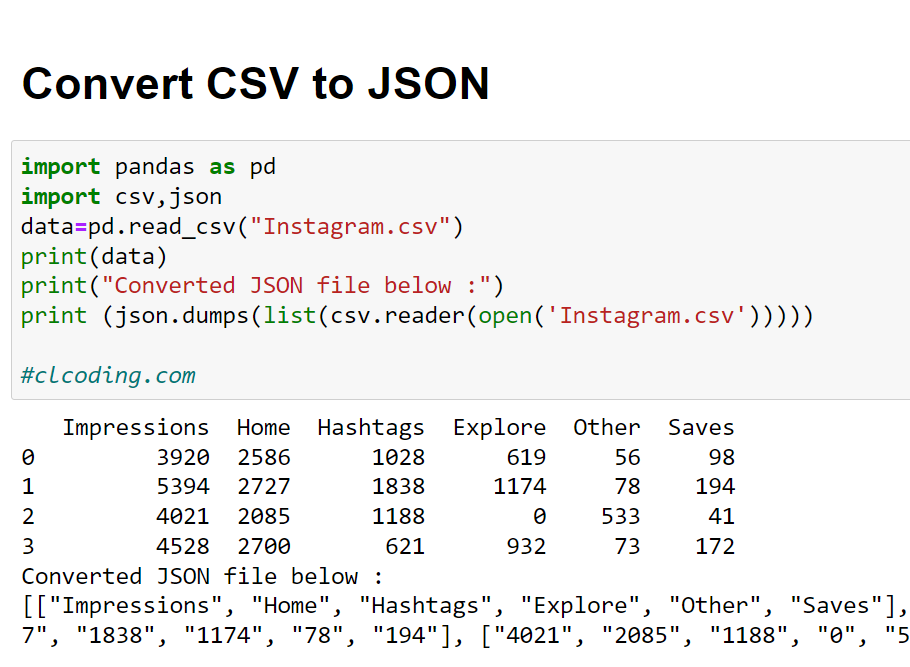
import pandas as pd
import csv,json
data=pd.read_csv("Instagram.csv")
print(data)
print("Converted JSON file below :")
print (json.dumps(list(csv.reader(open('Instagram.csv')))))
#clcoding.com
Impressions Home Hashtags Explore Other Saves
0 3920 2586 1028 619 56 98
1 5394 2727 1838 1174 78 194
2 4021 2085 1188 0 533 41
3 4528 2700 621 932 73 172
Converted JSON file below :
[["Impressions", "Home", "Hashtags", "Explore", "Other", "Saves"], ["3920", "2586", "1028", "619", "56", "98"], ["5394", "2727", "1838", "1174", "78", "194"], ["4021", "2085", "1188", "0", "533", "41"], ["4528", "2700", "621", "932", "73", "172"]]

import wifi_qrcode_generator as qr
qr.wifi_qrcode('wifi name ', False, 'WPA', 'password')
#clcoding.com
#you can scan and check this QR with your mobile
#thanks alot for watching
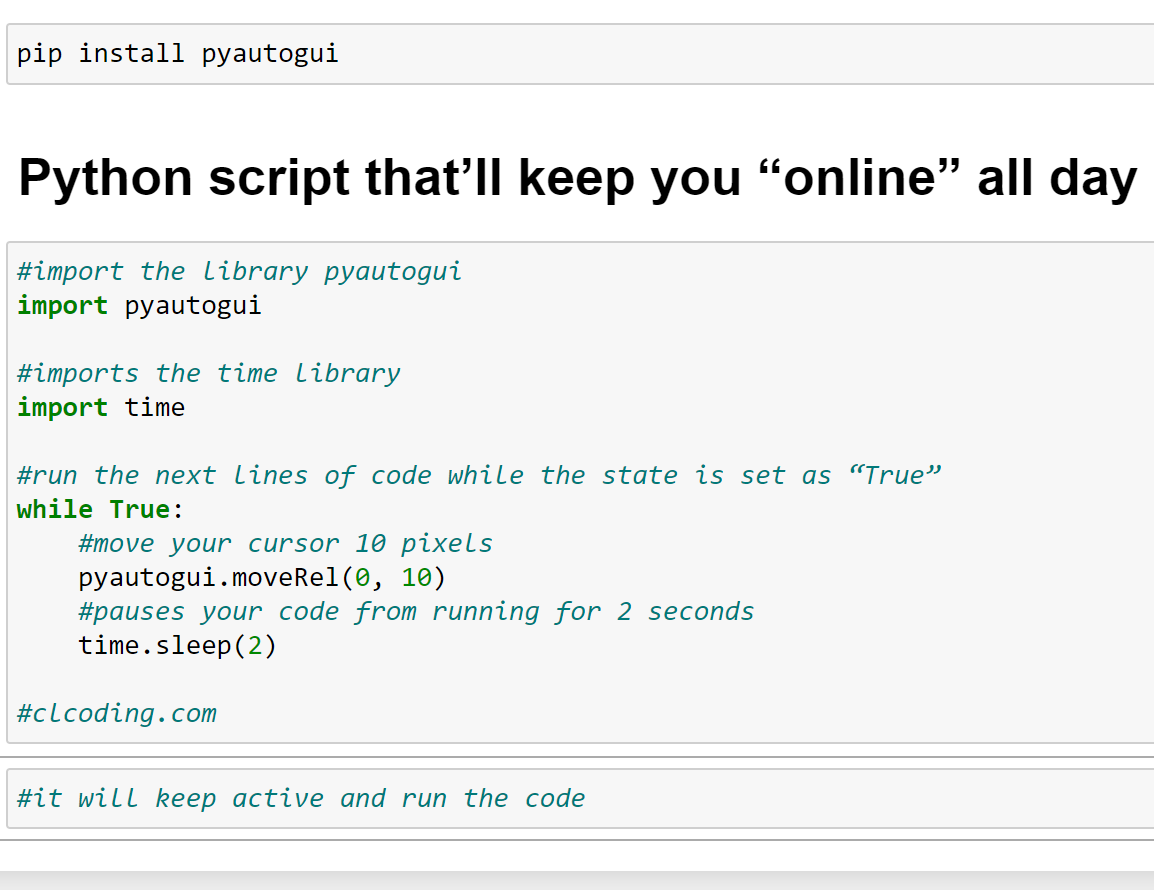
#import the library pyautogui
import pyautogui
#imports the time library
import time
#run the next lines of code while the state is set as “True”
while True:
#move your cursor 10 pixels
pyautogui.moveRel(0, 10)
#pauses your code from running for 2 seconds
time.sleep(2)
#clcoding.com

#reading an Image
from PIL import Image
Image.open("wolf.png")
import pywhatkit
pywhatkit.image_to_ascii_art('wolf.png','MyArt')
#reading text file
read_file= open("MyArt.txt","r")
print(read_file.read()) #clcoding.com
..::.:::.:::.:::.::..::.:::.:::.:::.::..::.:::.:::.:::.::..::..::.:::.:::.:::.::
::.:::.:::.:::.::.:::.:::.:::.:::.:::.::::::.:::.:::.::..::..::.:::.:::.:::.:::.
.:::.:::.:::.:::$#S#*::.:::.:::.:::.::::::.:::.:::.::.:$SS@*:.:::.:::.:::.:::.::
::.:::.:::.::.!#**#S*@:...:::.:::.:::.::.:::.:::.::.:*#**#**$::.:::.:::.:::.:::.
.:::.:::.:::.:#**$*%S*S&%!:..::.::..::.:::..::..:.:%#**S@*$**$.::.:::.:::.:::.::
::.:::.:::.::$**@***&##***S@*..:..!::::#@.:!..:!$&**S##&%**&**!.:::.:::.:::.:::.
::::.:::.::..#**%***%##&&#S**#**$@SSSS***#S#*%S***#&&#&****%**%::.:::.:::.:::.::
::::::.::!@&&**S***%%*%@##&&#******S##SS$#*****#@&#&@%*%%**%**%..::.:::.:::.:::.
::::.:::.:*****#**%@*&%**$##&@S*&#%*******&S*&@&S#$**%#*&%*%S*#@@*:::.::::::::::
::::::::::$***#$**$S***$***@*#@#@*@%***%@*$&@$#*@***@***S$**$#***$:.::::::::::::
:::::::::.*S***&%*%&****%***$*@#*S&@***%&S*S@@S$***$****#***&****$::::::::::::::
:::::::::.%***@%**$&**SS@****@%@$%*******$$&$@&****&****#$**%S***#:.::::::::::::
::::::::::%#**@***@*##$*%**************************%*$&#*&***S***#::::::::::::::
:::::::::!&****@***%************************************%%**@****#*:::::::::::::
::::::::::&***&$%$$*******%*************************%%******$#****%!.:::::::::::
::::::::*@S***##&@%****%@@&&@%*******************%$@@@@@$****%$#****@:..::::::::
:::::::::$****S@*******%*%%$@&@$***************%@@$%%***%*******@S***#$!::::::::
::::::::@****S$***************%$$%************$$%****************@*****@!:::::::
::::::!%S***S@%***************************************************&****#$!::::::
:::::.!@**S@*******************************************************%#**S$:.:::::
::::!$S***#%*************%%$#@*********%*********%#@%%%*************$#***S@!::::
:::.%S****#%**********%@&@@&**@**%*****@%@***%%*%S*@@@@@$%**********%#*****$::::
:::*&S***S&%**********%$&S*S&#*&*$#%**%%%%**@#%$*S&&*#$$$%***********@*****#%!::
::!%****S&$$%%***%$$$%%***@SSS**S$$#%*$@@**@@*@**##S#$***%$@@@$***%%$$@S***S%!::
::..%&###****&*%@@$%***%$@@&&@$$&S#$$*#$&%$%%#*&%*%$@@@@$%**%$@&$*&*****S&&%.:::
::::...:$S*#%**%%****%%$$@@$$$****$@$#&$$@%%@$%***%$@@@$$$%*****%**@S**#!...::::
:::::!$S***#&@**********************%%%%%*%%**********************$&#****@!.::::
:::!$S******#%******$##@@@$$$%*****%$@@@@@@@$%****%$$$$@@##$******%#******S@!.::
::::!!%#***S#SS$****%$&@%%$$%@@****%$@@@@@@@$%***@@%$$%*@&$%****%#S#****#%!!::::
::::.!$$$$&***#*****$@$@$%%@&$@****%$@@@@@@@$%**%@$&$%%@@@@$*****@****@$$$!:::::
::::::..:%S****#&$***$@@$%**$*#****%$@@@@@@@$%***&*%**%$@@$***%%S***&$!..:::::::
.:::.:::*$**$&***&***%%%%***#*@****%%$$$$$$%%%***$S@***%%%%***@***SS&:.::.:::.::
::.:::.::...!&***#@%*******#*$*****@########$****%$S@*******%$&***$::::.:::.:::.
.:::.:::.::%##@#***&%$%****S*&$***$****SS****%**%$#*&*****%*$****$!::.:::.:::.::
::.:::.::::!:...******%%***$*S#$***#********#**%@#**%*****#S#**S%!..:::.:::.:::.
.:::.:::.::..::.!#@S**S@**%%S#*#%***@#&$@##@***%&*S#%***%#S**@&#*.:::.:::.:::.::
::.:::.:::.:::.::.:SS**&@#***&&*&&@$$$$@@$$$$@&&S&#**S&$$*****..:::.:::.:::.:::.
.:::.:::.:::.:::.:!*:$***S&%%*$S%:&%S#****S*$#!*#$*#*@S***S!*!.::.:::.:::.:::.::
::.:::.:::.:::.:::.:.%*&*:.:.&S$**$#********#&!S$S**..:%#*#..::.:::.:::.:::.:::.
.:::.:::.:::.:::.:::.!*..::..!*&&*@**********&S&&*@.::..:%*::.:::.:::.:::.:::.::
::.:::.:::.:::.:::.::..::.:::.**@#*#@S&*#S#$&*S@*#::.:::.::::::.:::.:::.:::.:::.
.:::.:::.:::.:::.::::::.:::.::.%*@#$!*!$%$*%$&&*#:.:::.:::.::.:::.:::.:::.:::.::
::.:::.:::.:::.:::.::.:::.:::..!**&@@@@@&@@@@#**!.::.:::.::::::.:::.:::.:::.:::.
.:::.:::.:::.:::.::::::.:::.::::&**S&$$%*%%&&#*@::.:::.:::.::.:::.:::.:::.:::.::
::.:::.:::.:::.::::::::::.:::.:::$#*****@S****@:.:::.:::.::::::.:::.:::.:::.:::.
.:::.:::.:::.:::.::::::.:::.:::.::.*###***#&@$.:::.:::.::::::::::.:::.:::.:::.::
::::::.:::.:::.::::::::::.:::.:::.::::!$!$!...::.:::.::::::::::.:::.:::.:::.:::.
::::::::.::::::::::::::::::::::.::::::..:..:::::::.:::.::::::::::.:::.::::::::::
::::::::::::::::::::::::::::::::::::::::::::::::::::::::::::::::::::::::::::::::
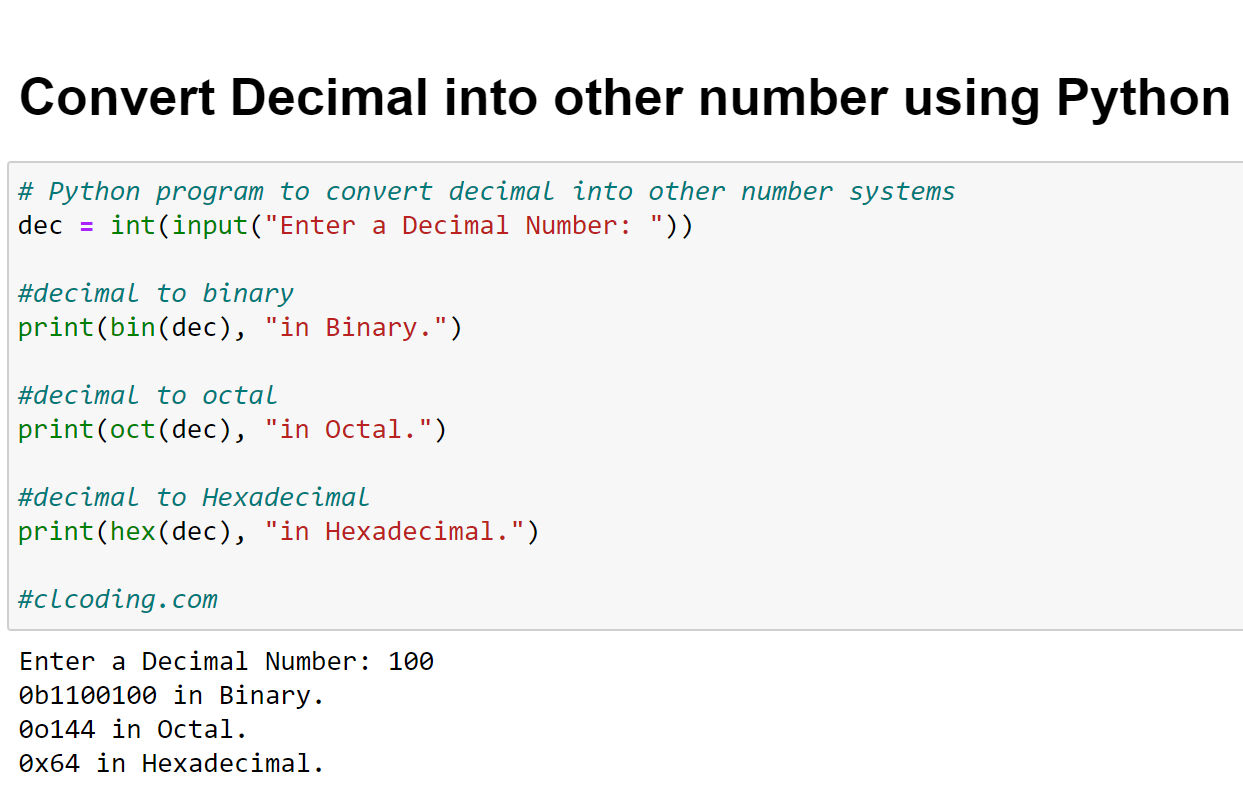
# Python program to convert decimal into other number systems
dec = int(input("Enter a Decimal Number: "))
#decimal to binary
print(bin(dec), "in Binary.")
#decimal to octal
print(oct(dec), "in Octal.")
#decimal to Hexadecimal
print(hex(dec), "in Hexadecimal.")
#clcoding.com
Enter a Decimal Number: 9999
0b10011100001111 in Binary.
0o23417 in Octal.
0x270f in Hexadecimal.

import pyqrcode
from PIL import Image
link = input("Enter anything to generate QR : ")
qr_code = pyqrcode.create(link)
qr_code.png("QRCode.png", scale=5)
Image.open("QRCode.png")
#clcoding.com

Enter the Phone Number: +447894561236
United Kingdom

from PIL import Image
def Images_Pdf(filename, output):
images = []
for file in filename:
im = Image.open(file)
im = im.convert('RGB')
images.append(im)
images[0].save(output, save_all=True, append_images=images[1:])
#clcoding.com
# Images Path , output pdf
Images_Pdf(["binod_mirror.png", "binod.png", "binod.jpg"], "output.pdf")

pip install pytesseract
pip install pillow
from PIL import Image
from pytesseract import pytesseract
#Define path to tessaract.exe
path_to_tesseract = r'C:\Program Files\Tesseract-OCR\tesseract.exe'
#Define path to image
path_to_image = 'texttoimage.png'
#Point tessaract_cmd to tessaract.exe
pytesseract.tesseract_cmd = path_to_tesseract
#Open image with PIL
img = Image.open(path_to_image)
#Extract text from image
text = pytesseract.image_to_string(img)
print(text)
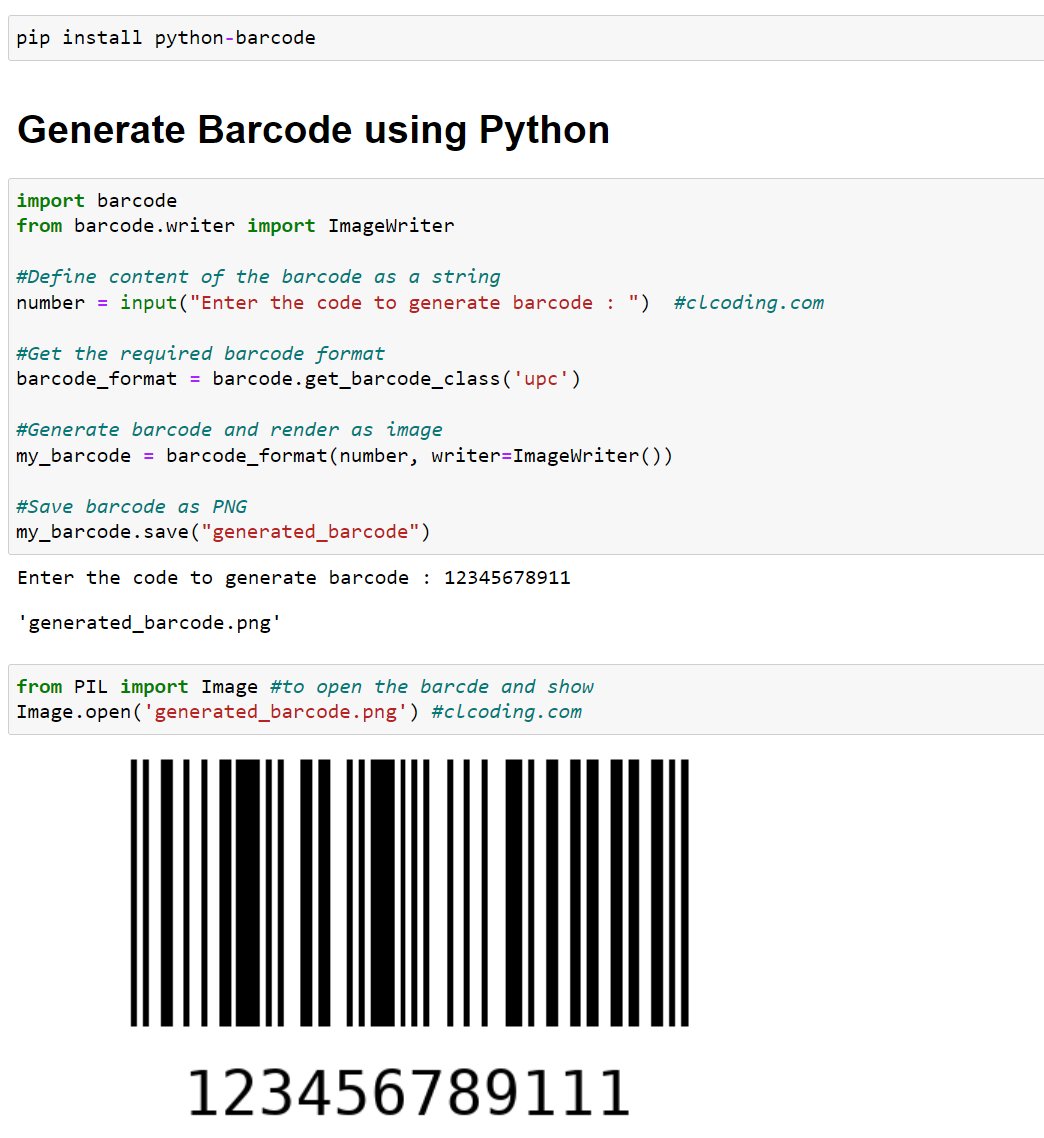
pip install python-barcode
import barcode
from barcode.writer import ImageWriter
#Define content of the barcode as a string
number = input("Enter the code to generate barcode : ") #clcoding.com
#Get the required barcode format
barcode_format = barcode.get_barcode_class('upc')
#Generate barcode and render as image
my_barcode = barcode_format(number, writer=ImageWriter())
#Save barcode as PNG
my_barcode.save("generated_barcode")
from PIL import Image #to open the barcde and show
Image.open('generated_barcode.png') #clcoding.com

img=Image.open('binod.jpg')
# The file format of the source file.
print(img.format) # Output: JPEG
# The pixel format used by the image.
#Typical values are "1", "L", "RGB", or "CMYK."
print(img.mode) # Output: RGB
# Image size, in pixels.
print(img.size) # Output: (1920, 1280)
print(img.palette) # Output: None
JPEG
RGB
(500, 271)
None

img = Image.open('binodd.jpg') #clcoding.com
Mirror_Image=img.transpose(Image.FLIP_LEFT_RIGHT)
Mirror_Image.save(r'binod_mirror.png')
Image.open('binod_mirror.png') #mirrored Image
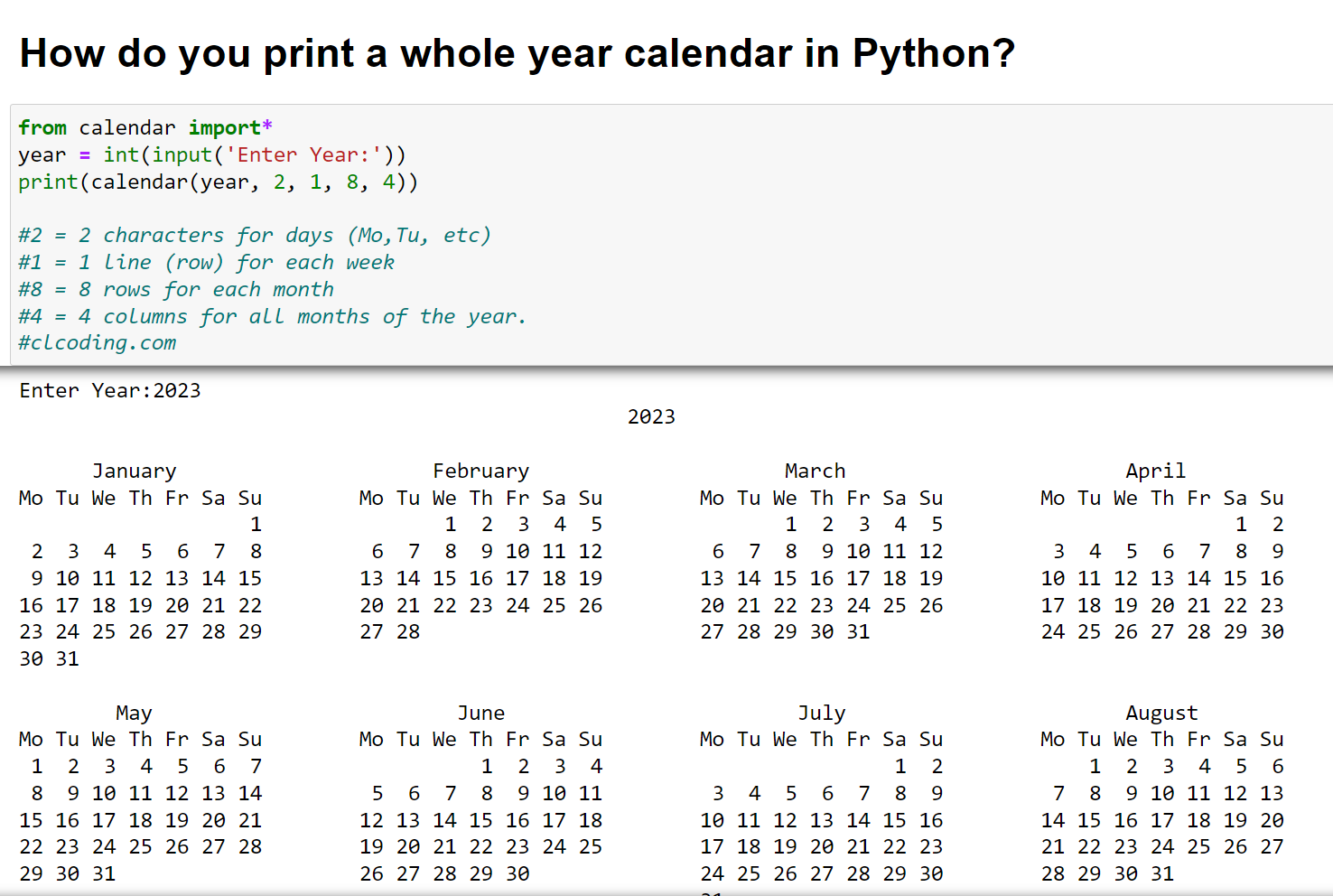
from calendar import*
year = int(input('Enter Year:'))
print(calendar(year, 2, 1, 8, 4))
#2 = 2 characters for days (Mo,Tu, etc)
#1 = 1 line (row) for each week
#8 = 8 rows for each month
#4 = 4 columns for all months of the year.
#clcoding.com
                                            2023

      January                     February                     March                       April
Mo Tu We Th Fr Sa Su        Mo Tu We Th Fr Sa Su        Mo Tu We Th Fr Sa Su        Mo Tu We Th Fr Sa Su
                   1               1  2  3  4  5               1  2  3  4  5                        1  2
 2  3  4  5  6  7  8         6  7  8  9 10 11 12         6  7  8  9 10 11 12         3  4  5  6  7  8  9
 9 10 11 12 13 14 15        13 14 15 16 17 18 19        13 14 15 16 17 18 19        10 11 12 13 14 15 16
16 17 18 19 20 21 22        20 21 22 23 24 25 26        20 21 22 23 24 25 26        17 18 19 20 21 22 23
23 24 25 26 27 28 29        27 28                       27 28 29 30 31              24 25 26 27 28 29 30
30 31

        May                         June                        July                       August
Mo Tu We Th Fr Sa Su        Mo Tu We Th Fr Sa Su        Mo Tu We Th Fr Sa Su        Mo Tu We Th Fr Sa Su
 1  2  3  4  5  6  7                  1  2  3  4                        1  2            1  2  3  4  5  6
 8  9 10 11 12 13 14         5  6  7  8  9 10 11         3  4  5  6  7  8  9         7  8  9 10 11 12 13
15 16 17 18 19 20 21        12 13 14 15 16 17 18        10 11 12 13 14 15 16        14 15 16 17 18 19 20
22 23 24 25 26 27 28        19 20 21 22 23 24 25        17 18 19 20 21 22 23        21 22 23 24 25 26 27
29 30 31                    26 27 28 29 30              24 25 26 27 28 29 30        28 29 30 31
                                                        31

     September                    October                     November                    December
Mo Tu We Th Fr Sa Su        Mo Tu We Th Fr Sa Su        Mo Tu We Th Fr Sa Su        Mo Tu We Th Fr Sa Su
             1  2  3                           1               1  2  3  4  5                     1  2  3
 4  5  6  7  8  9 10         2  3  4  5  6  7  8         6  7  8  9 10 11 12         4  5  6  7  8  9 10
11 12 13 14 15 16 17         9 10 11 12 13 14 15        13 14 15 16 17 18 19        11 12 13 14 15 16 17
18 19 20 21 22 23 24        16 17 18 19 20 21 22        20 21 22 23 24 25 26        18 19 20 21 22 23 24
25 26 27 28 29 30           23 24 25 26 27 28 29        27 28 29 30                 25 26 27 28 29 30 31
                            30 31

import whois
domain=input("Enter your Domain : ")
domain_info = whois.whois(domain)
for key, value in domain_info.items():
print(key,':', value)
Enter your Domain : https://www.clcoding.com/
domain_name : ['CLCODING.COM', 'clcoding.com']
registrar : Google LLC
whois_server : whois.google.com
referral_url : None
updated_date : 2022-04-12 07:43:54
creation_date : 2019-04-12 02:05:57
expiration_date : 2023-04-12 02:05:57
name_servers : ['NS-CLOUD-B1.GOOGLEDOMAINS.COM', 'NS-CLOUD-B2.GOOGLEDOMAINS.COM', 'NS-CLOUD-B3.GOOGLEDOMAINS.COM', 'NS-CLOUD-B4.GOOGLEDOMAINS.COM']
status : ['clientTransferProhibited https://icann.org/epp#clientTransferProhibited', 'clientTransferProhibited https://www.icann.org/epp#clientTransferProhibited']
emails : registrar-abuse@google.com
dnssec : unsigned
name : Contact Privacy Inc. Customer 7151571251
org : Contact Privacy Inc. Customer 7151571251
address : 96 Mowat Ave
city : Toronto
state : ON
registrant_postal_code : M4K 3K1
country : CA

#The `skimage` package comes with data built-in that
#you can run computer vision algorithms
from skimage import data, io, filters
image = data.coins()
edges = filters.sobel(image)
io.imshow( edges)
#clcoding.com

import urllib.request
url=input("Enter Link to Download PDF : ")
Name=input("Enter a Name for the PDF File : ")
FileName = Name+".pdf"
urllib.request.urlretrieve(url,FileName)
#clcoding.com

import webbrowser
Url=input("Enter a url : ")
webbrowser.open(Url)
#Open the page in a new browser window.
webbrowser.open_new('Url')
#Open the page in a new browser tab.
webbrowser.open_new_tab('Url')
#clcoding.com

pip install plyer
import time
from plyer import notification
if __name__ == "__main__":
while True:
notification.notify(
title = "ALERT!!!",
message = "Take a break! It has been an hour!",
timeout = 10
)
time.sleep(3600)
#clcoding.com
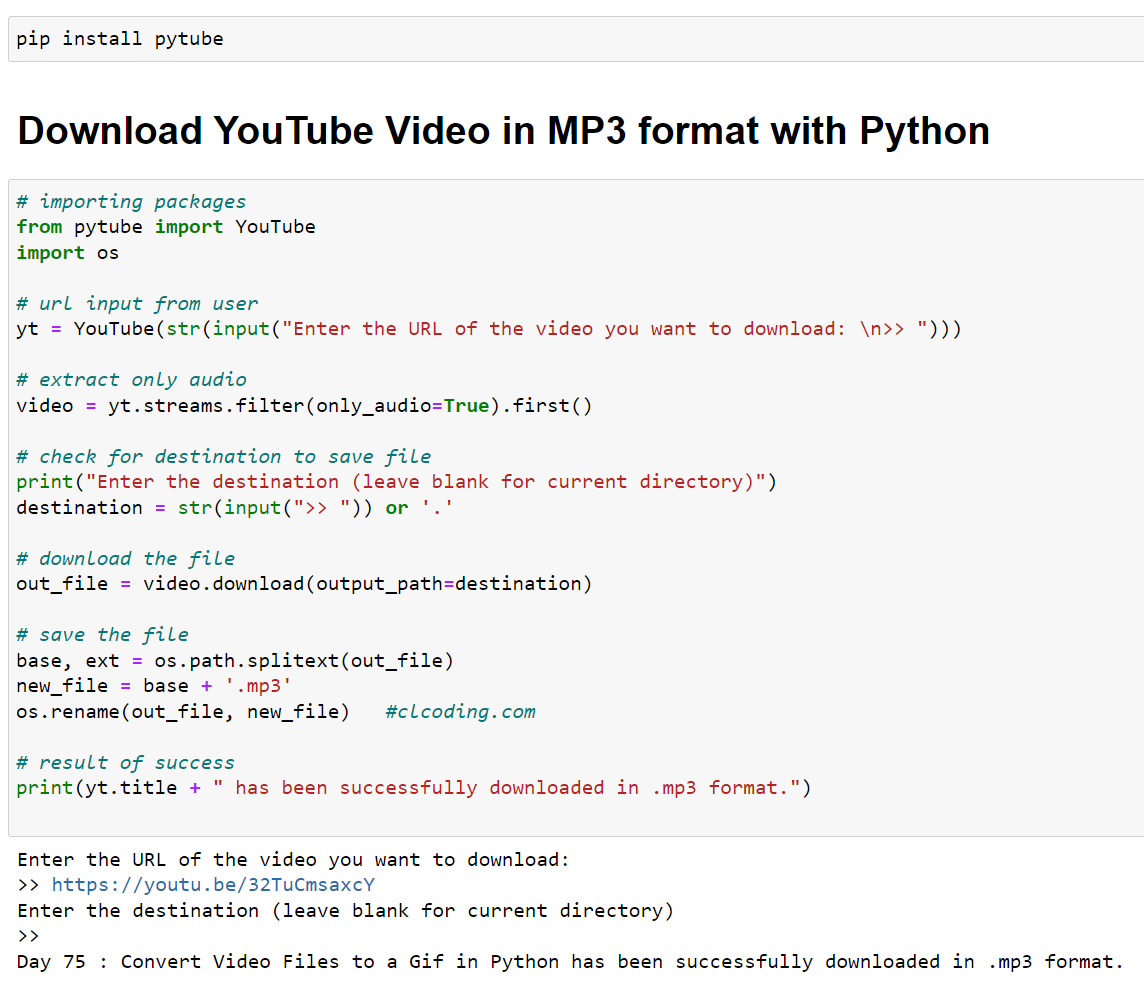
# importing packages
from pytube import YouTube
import os
# url input from user
yt = YouTube(str(input("Enter the URL of the video you want to download: \n>> ")))
# extract only audio
video = yt.streams.filter(only_audio=True).first()
# check for destination to save file
print("Enter the destination (leave blank for current directory)")
destination = str(input(">> ")) or '.'
# download the file
out_file = video.download(output_path=destination)
# save the file
base, ext = os.path.splitext(out_file)
new_file = base + '.mp3'
os.rename(out_file, new_file) #clcoding.com
# result of success
print(yt.title + " has been successfully downloaded in .mp3 format.")

from pdf2docx import Converter
pdf_file = 'clcoding.pdf'
docx_file = 'clcoding.docx'
cv = Converter(pdf_file)
cv.convert(docx_file)
cv.close()
#clcoding.com
[INFO] Start to convert clcoding.pdf
[INFO] [1/4] Opening document...
[INFO] [2/4] Analyzing document...
[INFO] [3/4] Parsing pages...
[INFO] (1/1) Page 1
[INFO] [4/4] Creating pages...
[INFO] (1/1) Page 1
[INFO] Terminated in 0.16s.
INDIAN Flag in Python. All dimensions are as per our INDIAN standards. Let us know if you have any suggestions.
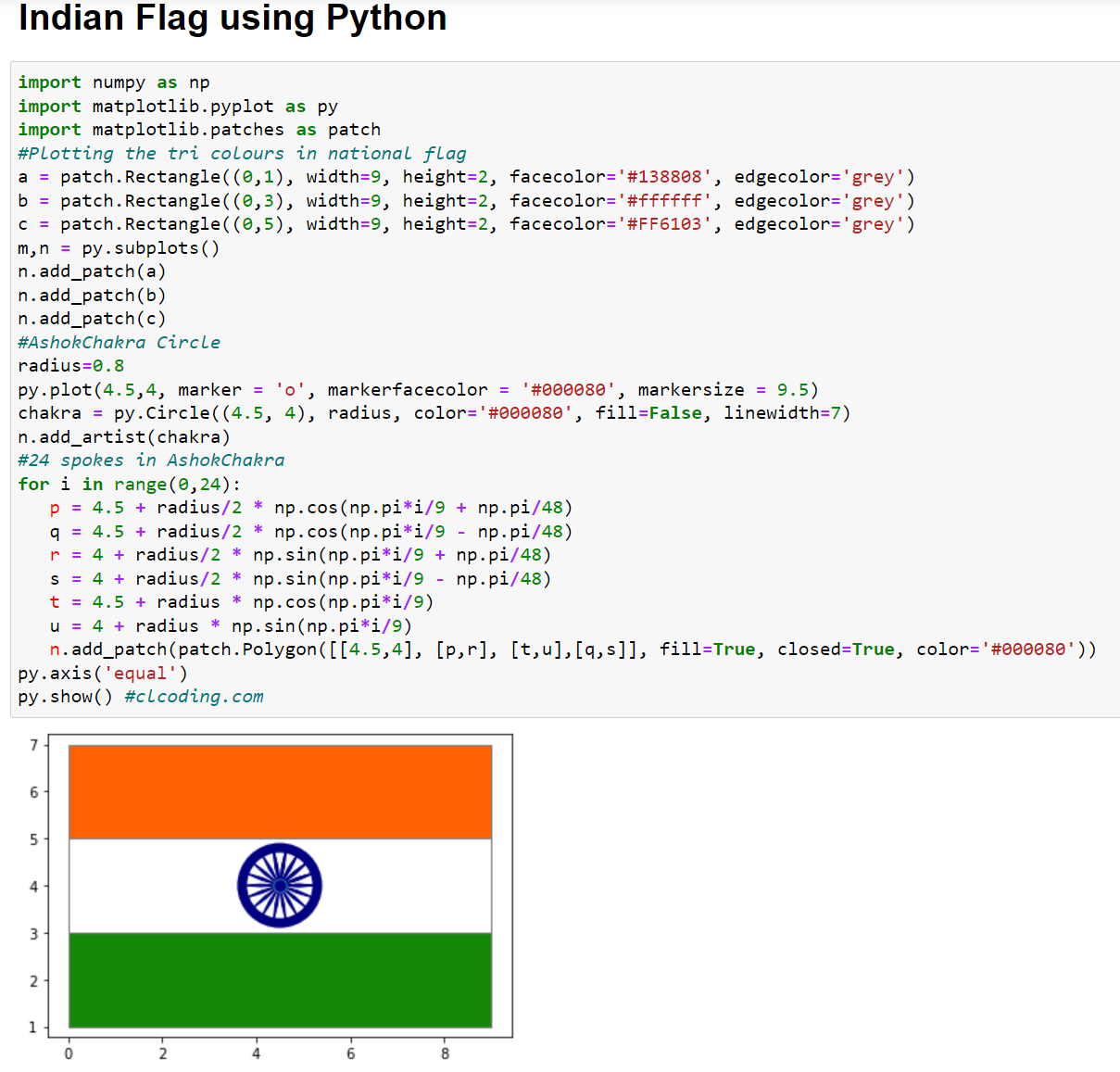
import numpy as np
import matplotlib.pyplot as py
import matplotlib.patches as patch
#Plotting the tri colours in national flag
a = patch.Rectangle((0,1), width=9, height=2, facecolor='#138808', edgecolor='grey')
b = patch.Rectangle((0,3), width=9, height=2, facecolor='#ffffff', edgecolor='grey')
c = patch.Rectangle((0,5), width=9, height=2, facecolor='#FF6103', edgecolor='grey')
m,n = py.subplots()
n.add_patch(a)
n.add_patch(b)
n.add_patch(c)
#AshokChakra Circle
radius=0.8
py.plot(4.5,4, marker = 'o', markerfacecolor = '#000080', markersize = 9.5)
chakra = py.Circle((4.5, 4), radius, color='#000080', fill=False, linewidth=7)
n.add_artist(chakra)
#24 spokes in AshokChakra
for i in range(0,24):
p = 4.5 + radius/2 * np.cos(np.pi*i/9 + np.pi/48)
q = 4.5 + radius/2 * np.cos(np.pi*i/9 - np.pi/48)
r = 4 + radius/2 * np.sin(np.pi*i/9 + np.pi/48)
s = 4 + radius/2 * np.sin(np.pi*i/9 - np.pi/48)
t = 4.5 + radius * np.cos(np.pi*i/9)
u = 4 + radius * np.sin(np.pi*i/9)
n.add_patch(patch.Polygon([[4.5,4], [p,r], [t,u],[q,s]], fill=True, closed=True, color='#000080'))
py.axis('equal')
py.show() #clcoding.com


from zipfile import ZipFile
with ZipFile('binod.zip', 'r') as zip_object:
zip_object.extractall()
#list of files that are archived in the ZIP file
print(zip_object.namelist())
#clcoding.com
['binod.jpg', 'BumBumBole.gif', 'clcoding.pdf', 'file1.pdf']
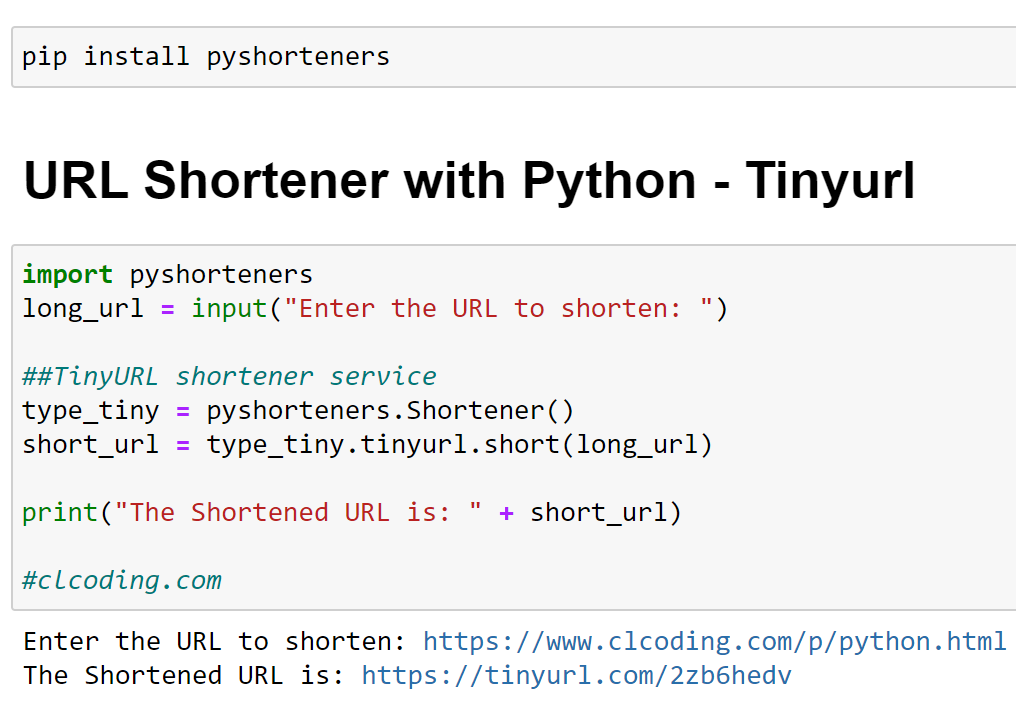
import pyshorteners
long_url = input("Enter the URL to shorten: ")
##TinyURL shortener service
type_tiny = pyshorteners.Shortener()
short_url = type_tiny.tinyurl.short(long_url)
print("The Shortened URL is: " + short_url)
#clcoding.com
Enter the URL to shorten: https://www.clcoding.com/p/python.html
The Shortened URL is: https://tinyurl.com/2zb6hedv

import PyPDF2
import pyttsx3
engine = pyttsx3.init()
# Read the pdf by specifying the path in your computer
pdfReader = PyPDF2.PdfFileReader(open('clcoding.pdf', 'rb'))
# Get the handle to speaker
speaker = pyttsx3.init()
# split the pages and read one by one
for page_num in range(pdfReader.numPages):
text = pdfReader.getPage(page_num).extractText()
speaker.say(text) #clcoding.com
speaker.runAndWait()
# stop the speaker after completion
speaker.stop()
# save the audiobook at specified path
engine.save_to_file(text, 'E:\audio.mp3')
engine.runAndWait()

import demoji
text="🇮🇳 📚 ❤️ 🌺 🌹 👶"
demoji.findall(text)
#clcoding.com
{'📚': 'books',
 '👶': 'baby',
 '🇮🇳': 'flag: India',
 '🌺': 'hibiscus',
 '🌹': 'rose',
 '❤️': 'red heart'}


.png)





.png)







 Posts
All Comments
Posts
All Comments


