Saturday, 4 January 2025

IBM IT Support Professional Certificate


IBM IT Support Professional Certificate

In today’s fast-paced digital world, technical support has become a cornerstone of successful business operations. From troubleshooting software issues to ensuring seamless IT operations, technical support professionals are vital in keeping systems running smoothly. As businesses increasingly rely on technology, the demand for skilled technical support professionals continues to grow. IBM’s Technical Support Professional Certificate on Coursera offers an exceptional pathway to gaining the skills and knowledge required to thrive in this dynamic field.

The Importance of Technical Support in Modern Businesses

Technical support is the backbone of any organization that depends on technology. It ensures minimal downtime, enhances user experience, and safeguards business continuity. Professionals in this field provide essential services such as system troubleshooting, software installation, network maintenance, and customer assistance.

With technology evolving rapidly, the need for well-trained technical support personnel who can adapt to new tools and challenges is more critical than ever. IBM, a global leader in technology, has designed this certificate program to empower learners with industry-relevant skills, ensuring they’re job-ready from day one.

What Makes the IBM Technical Support Professional Certificate Stand Out?


This program is tailored for individuals at all stages of their careers, whether they’re newcomers to the tech world or seasoned professionals seeking to upskill. Here are some key highlights:

1. Comprehensive Curriculum

The program comprises several courses that cover a broad spectrum of technical support essentials, including:

Fundamentals of IT and Technical Support: Gain a solid understanding of computer systems, networking, and software.

Operating Systems: Explore the features and functionalities of popular operating systems, including Windows, Linux, and macOS.

Networking Basics: Learn foundational networking concepts, including protocols, troubleshooting, and security.

Troubleshooting Techniques: Develop problem-solving skills to diagnose and fix technical issues effectively.

Customer Support Skills: Understand the best practices for delivering excellent customer service in technical roles.

2. Hands-On Learning

Practical experience is at the core of this program. Through interactive labs and real-world scenarios, learners can:

Configure and troubleshoot hardware and software systems.

Simulate network setups and resolve connectivity issues.

Use industry-standard tools for IT support, such as ticketing systems and diagnostic software.

3. Flexible and Accessible Learning

The program’s online and self-paced structure makes it accessible to learners worldwide. Whether you’re balancing work, studies, or personal commitments, you can tailor your learning schedule to fit your lifestyle.

4. Globally Recognized Credential

Upon completion, participants earn a certificate from IBM, a credential that is respected and recognized by employers across industries. This certificate serves as a testament to your expertise and readiness for technical support roles.

5. Career Preparation and Growth

IBM’s program not only imparts technical skills but also prepares learners for the job market. Resume-building tips, interview preparation, and insights into career paths ensure that graduates are well-equipped to secure and excel in technical support positions.

What you'll learn

  • Master the most up-to-date practical skills and tools used by IT support professionals and how to apply them in an everyday professional setting
  • Learn hardware and software skills that help users select, install, and configure their devices, operations systems, and applications
  • Develop a strong IT foundation in topics including cybersecurity, networking, cloud, databases, and be prepared for CompTIA certification exams
  • Practice customer service and troubleshooting skills by using ticketing systems, hands-on labs, demos, and interactive exercises

Career Opportunities for Graduates


Technical support professionals play diverse roles across industries. Completing this certificate can open doors to positions such as:

Help Desk Technician: Provide first-line technical assistance to users experiencing IT issues.

Technical Support Specialist: Resolve complex hardware and software problems.

IT Support Engineer: Maintain and optimize IT systems to ensure seamless operations.

Network Support Technician: Troubleshoot and maintain networking systems and devices.

Benefits of Earning the IBM Technical Support Certificate


Job-Ready Skills: Master the tools and techniques needed to excel in technical support roles.

Industry Recognition: Earn a credential from IBM, a leader in technology and innovation.

Enhanced Employability: Develop a strong foundation in IT and customer support, making you a valuable asset to any organization.

Hands-On Experience: Build confidence through real-world projects and labs.

Global Accessibility: Learn from anywhere, at your own pace, with IBM’s expert-designed content.

Join Free: IBM IT Support Professional Certificate

Conclusion:

The IBM Technical Support Professional Certificate on Coursera is a gateway to a fulfilling career in the ever-expanding field of IT support. Whether you’re starting fresh or looking to enhance your existing skills, this program offers the knowledge, hands-on experience, and industry recognition needed to succeed. Begin your journey today and position yourself as a vital player in the technology-driven world.


IBM Data Management Professional Certificate


IBM Data Management Professional Certificate

Data has become the cornerstone of modern decision-making and business strategy. With organizations generating vast amounts of information daily, the ability to manage, secure, and leverage data effectively has never been more critical. Professionals skilled in data management are in high demand, offering rewarding opportunities for those prepared to meet the challenge. Enter the IBM Data Manager Professional Certificate on Coursera, a program designed to equip learners with the tools and knowledge to excel in this essential field.

Why Data Management Matters


In the digital age, data is more than just numbers and records; it is a strategic asset. Businesses rely on data to drive innovation, improve efficiency, and maintain a competitive edge. However, managing data effectively requires more than just technical know-how. It demands an understanding of governance, security, and best practices for extracting actionable insights.

The IBM Data Manager Professional Certificate is crafted to bridge this knowledge gap. Designed by experts at IBM, this program is ideal for:

Aspiring Data Professionals: Build a strong foundation in data management concepts.

Career Changers: Transition into the booming field of data management.

Experienced Practitioners: Enhance existing skills with the latest tools and practices.

What you'll learn

  • Complete set of job-ready skills to kickstart your career as a data manager in less than 6 months. No prior experience required.
  • Practical, hands-on skills using essential tools such as spreadsheets, business intelligence (BI), databases, and SQL.
  • Key skills for collaborating across teams, aligning data strategies with business objectives, and communicating data insights using visualizations.
  • A solid foundation of data management concepts, including cloud environments, data processing, integration, storage, scalability, and security.

Key Features of the Program

This professional certificate offers a comprehensive learning experience, blending theory and hands-on practice to ensure learners gain a well-rounded understanding of data management. Here are the key highlights:

1. Comprehensive Curriculum

The program consists of multiple courses, each targeting critical areas of data management, including:

Introduction to Data Management: Learn the fundamentals, such as data lifecycles, types of databases, and the role of data in modern business.

Database Design and Development: Explore relational and non-relational databases, gaining insights into designing efficient data systems.

Data Security and Governance: Understand best practices for protecting data integrity and ensuring compliance with global standards.

Advanced Topics: Dive into cloud-based data management, big data, and the integration of AI tools for smarter data handling.

2. Hands-On Projects

Practical experience is at the heart of this certificate. Learners will work on real-world projects, such as:

Designing and implementing secure databases.

Developing workflows for effective data storage and retrieval.

Applying governance frameworks to manage data ethically and efficiently.

3. Industry-Relevant Tools

Participants gain experience with leading data management tools and platforms, including IBM’s advanced software solutions. This hands-on training ensures readiness for roles that require proficiency with modern data technologies.

4. Flexible Learning

The program is fully online and self-paced, accommodating the schedules of working professionals and students alike. Learners can progress at their own pace while receiving guidance and support from IBM-certified instructors.

5. Globally Recognized Credential

Upon completion, learners earn a certificate from IBM, a brand synonymous with innovation and excellence. This credential is a testament to your expertise and is recognized by employers worldwide.

Benefits of Completing This Certificate

Skill Development: Gain in-demand skills such as database design, data governance, and security.

Career Advancement: Unlock opportunities for roles such as Data Manager, Database Administrator, and Data Analyst.

Networking Opportunities: Connect with peers and industry professionals through Coursera’s collaborative platform.

IBM Expertise: Learn from one of the most respected names in technology.

Portfolio Building: Showcase your expertise through practical projects that can be shared with potential employers.

Join Free: IBM Data Management Professional Certificate

Conclusion:

The IBM Professional Certificates in AI and Data Management provide a unique opportunity for learners to gain industry-relevant skills and advance their careers in technology. With IBM’s expertise and Coursera’s accessible platform, these programs are tailored for individuals eager to thrive in the evolving digital landscape. Whether you aspire to become an AI expert or a data management professional, these certifications offer the knowledge, tools, and credentials to achieve your goals. Embark on your journey today and take the first step towards unlocking your potential in these dynamic

IBM AI Developer Professional Certificate


IBM AI Developer Professional Certificate

Artificial intelligence (AI) has emerged as one of the most transformative technologies of the 21st century, reshaping industries, revolutionizing workflows, and redefining career paths. From enhancing customer experiences with AI-powered chatbots to optimizing supply chains using predictive analytics, AI’s potential is vast and continuously evolving. For individuals aspiring to harness this potential, gaining a strong foundation in AI concepts and tools is critical.

The Applied Artificial Intelligence Professional Certificate by IBM, offered on Coursera, stands out as a gateway to the world of AI. Designed with accessibility in mind, this program caters to both beginners and professionals who wish to explore AI's practical applications without requiring prior programming knowledge. What sets this certificate apart is its dual focus on theory and hands-on learning, enabling learners to not only understand AI concepts but also apply them in real-world scenarios.

  • This comprehensive program is ideal for anyone who:
  • Seeks to integrate AI solutions into their professional roles to boost productivity and innovation.
  • Aims to pivot to an AI-centric career, equipped with in-demand skills.
  • Desires a structured, yet flexible learning path backed by IBM’s decades of expertise in technology and AI innovation.

The certificate program covers the essentials of AI, from machine learning and natural language processing to building intelligent chatbots using IBM’s Watson services. With a curriculum that emphasizes practicality and ethics, learners will gain a holistic understanding of AI’s capabilities, limitations, and impact on society. Furthermore, its online, self-paced format ensures accessibility for learners worldwide, regardless of their schedules or commitments.

Embarking on this learning journey promises not only skill development but also the opportunity to earn a globally recognized credential that validates your proficiency in AI. The program is structured to empower learners to innovate, solve complex problems, and stay ahead in a rapidly evolving technological landscape.

Why Choose This Certificate?

IBM’s reputation in technology and innovation is unparalleled. With decades of pioneering research and enterprise solutions, IBM brings its expertise to this program. The certificate is tailored for individuals who want to understand and implement AI solutions without requiring prior programming experience. It’s ideal for:

Business Professionals: Learn how to integrate AI into workflows, automate processes, and enhance decision-making with AI tools.

Students and Career Changers: Build foundational knowledge to transition into the rapidly growing field of AI.

AI Enthusiasts: Gain exposure to industry-leading tools and techniques to turn ideas into practical AI solutions.

What you'll learn

  • Job-ready AI skills in just 6 months, plus practical experience and an industry-recognized certification employers are actively looking for
  • The fundamental concepts, key terms, building blocks, and applications of AI, encompassing generative AI
  • How to build generative AI-powered apps and chatbots using various programming frameworks and AI technologies
  • How to use Python and Flask to develop and deploy AI applications on the web

Key Features of the Program

The program is designed to cater to a diverse audience, from beginners to intermediate learners. Here’s a detailed breakdown of what sets it apart:

Comprehensive Curriculum:

The certificate includes six meticulously designed courses that provide a strong foundation in AI. You’ll learn about:

Machine Learning Basics: Understand core concepts such as supervised and unsupervised learning, algorithms, and model evaluation.

Natural Language Processing (NLP): Dive into techniques used to process and analyze human language data, a cornerstone of AI applications.

AI-Powered Chatbots: Learn to build chatbots using IBM Watson, exploring its Assistant, Discovery, and other AI services.

AI Ethics: Examine the ethical implications of AI, including bias, fairness, and responsible usage.

Hands-On Learning:

Practical, project-based learning ensures you’re not just consuming knowledge but actively applying it. Projects include:

Developing chatbots that interact seamlessly with users.

Using AI models to solve real-world problems such as sentiment analysis and data categorization.

Implementing machine learning workflows using Python.

Flexibility:

The program is entirely online and self-paced, making it accessible to learners with busy schedules. Whether you dedicate a few hours a week or study full-time, the flexibility ensures you can progress at your own pace.

Career Support:

Upon completion, you’ll earn a professional certificate recognized globally. The skills and projects you complete will strengthen your portfolio, making you more attractive to employers in technology-driven industries.

Benefits of Earning This Certificate

Skill Development: Master cutting-edge skills such as NLP, chatbot creation, and machine learning.

Credibility: The certificate is issued by IBM, a leader in AI innovation, and recognized by top employers.

Industry Relevance: Gain practical experience with tools like IBM Watson, ensuring you’re ready to tackle real-world challenges.

Networking Opportunities: Engage with peers, instructors, and a global community of learners through Coursera’s platform.

Career Advancement: Open doors to roles like AI Analyst, Data Scientist, and Machine Learning Engineer.

Join Free: IBM AI Developer Professional Certificate

Conclusion

The IBM Applied Artificial Intelligence Professional Certificate is more than just a learning program; it’s a transformative journey into the world of AI. With a curriculum grounded in real-world applications, you’ll acquire the skills, knowledge, and confidence to innovate and excel in your career. Whether you’re looking to upskill, pivot to a new career, or simply explore AI, this program offers a comprehensive and accessible pathway. Embrace the future of technology with IBM and Coursera today!


Digital Clock in Python


import tkinter as tk

from time import strftime


root = tk.Tk()

root.title("Digital Clock")


# Define the clock label

clock_label = tk.Label(root, 

                       font=("Helvetica", 48),

                       bg="black", fg="cyan")

clock_label.pack(anchor="center", fill="both",

                 expand=True)


# Function to update the time

def update_time():

    current_time = strftime("%H:%M:%S")  

    clock_label.config(text=current_time)

    clock_label.after(1000, update_time)  


update_time()

root.mainloop()


#source code --> clcoding.com

Friday, 3 January 2025

Day 74 : Python Program to Count the Number of Vowels in a String


def count_vowels(input_string):

    vowels = "aeiouAEIOU"

    count = 0

    for char in input_string:

        if char in vowels:

            count += 1

    return count

user_input = input("Enter a string: ")

vowel_count = count_vowels(user_input)

print(f"The number of vowels in the string is: {vowel_count}")

#source code --> clcoding.com

Code Explanation:

def count_vowels(input_string):
def: This keyword defines a function in Python.
count_vowels: The name of the function.
input_string: A parameter representing the string passed to the function when called.

    vowels = "aeiouAEIOU"
vowels: A string containing all vowel characters (both lowercase and uppercase: 'a', 'e', 'i', 'o', 'u' and 'A', 'E', 'I', 'O', 'U').
This list of vowels will be used to check if a character is a vowel.

    count = 0
Initializes a variable count to 0. This variable will store the number of vowels found in the input string.

    for char in input_string:
for: A loop that iterates over each character in the input_string.
char: A temporary variable that represents the current character being processed in the string.

        if char in vowels:
if: A conditional statement that checks whether the current character (char) is present in the vowels string.
char in vowels: Returns True if the character is found in the vowels string, indicating that it is a vowel.

            count += 1
If the condition (char in vowels) is True, this line increments the count variable by 1. This tracks the total number of vowels encountered.

    return count
After the loop finishes processing all characters, this line returns the total value of count (the number of vowels) to the caller of the function.

user_input = input("Enter a string: ")
input(): Prompts the user to type a string into the program. It displays the message "Enter a string: " and waits for the user to input a value.
user_input: A variable that stores the string entered by the user.

vowel_count = count_vowels(user_input)
Calls the function count_vowels, passing the user-provided string (user_input) as an argument.
The function processes the string and returns the count of vowels.
The result is stored in the variable vowel_count.

print(f"The number of vowels in the string is: {vowel_count}")
print(): Outputs the specified message to the console.
f-string: A formatted string (introduced in Python 3.6) that allows embedding variables directly inside curly braces {}.
Displays the message along with the value of vowel_count.

Day 73: Python Program to Count Number of Lowercase Characters in a String


def count_lowercase_characters(input_string):

    count = 0

    for char in input_string:

        if char.islower():

            count += 1

       return count

user_input = input("Enter a string: ")

lowercase_count = count_lowercase_characters(user_input)

print(f"The number of lowercase characters in the string is: {lowercase_count}")

#source code --> clcoding.com

Code Explanation:

def count_lowercase_characters(input_string):
def: This keyword defines a function in Python.
count_lowercase_characters: The name of the function.
input_string: A parameter that represents the string passed to the function when called.

    count = 0
Initializes a variable count to 0. This variable will store the number of lowercase characters as they are counted.

    for char in input_string:
for: A loop that iterates over each character in the input_string.
char: A temporary variable that represents the current character being processed in the string.

        if char.islower():
if: A conditional statement that checks whether the condition is true.
char.islower(): A built-in Python method that returns True if char is a lowercase letter (e.g., 'a', 'z'), and False otherwise.

            count += 1
If the condition char.islower() is True, this line increments the count variable by 1. This tracks the total number of lowercase letters encountered.

    return count
After the loop finishes processing all characters, this line returns the total value of count (the number of lowercase characters) to the caller of the function.

user_input = input("Enter a string: ")
input(): A function that allows the user to type something into the program. It displays the prompt "Enter a string: " and waits for the user to input a value.
user_input: A variable that stores the string entered by the user.

lowercase_count = count_lowercase_characters(user_input)
Calls the function count_lowercase_characters and passes the user's input (user_input) as an argument.
The function processes the input and returns the count of lowercase characters.
The result is stored in the variable lowercase_count.

print(f"The number of lowercase characters in the string is: {lowercase_count}")
print(): Outputs the specified message to the console.
f-string: A formatted string (introduced in Python 3.6) that allows embedding variables directly inside curly braces {}.
Displays the message along with the value of lowercase_count.

Myanmar Flag using Python


import matplotlib.pyplot as plt

from matplotlib.patches import Polygon

import numpy as np


fig, ax = plt.subplots(figsize=(8, 5))

ax.fill_between([0, 3], 2, 3, color="#FED100")  

ax.fill_between([0, 3], 1, 2, color="#34B233")  

ax.fill_between([0, 3], 0, 1, color="#EA2839")  


def draw_star(center_x, center_y, radius, color, rotation_deg):

    points = []

    for i in range(10):

        angle = (i * 36 + rotation_deg) * (np.pi / 180)  

        r = radius if i % 2 == 0 else radius / 2  

        x = center_x + r * np.cos(angle)

        y = center_y + r * np.sin(angle)

        points.append((x, y))

    polygon = Polygon(points, closed=True, color=color)

    ax.add_patch(polygon)


draw_star(1.5, 1.5, 0.6, "white", rotation_deg=-55)  

ax.set_xlim(0, 3)

ax.set_ylim(0, 3)

ax.axis("off")

plt.show()

print("Happy Independence Day Myanmar ")


#source code --> clcoding.com

Create a map with search using Python


import folium

from geopy.geocoders import Nominatim

from IPython.display import display, HTML


location_name = input("Enter a location: ")


geolocator = Nominatim(user_agent="geoapi")

location = geolocator.geocode(location_name)


if location:


    # Create a map centered on the user's location

    latitude = location.latitude

    longitude = location.longitude

    clcoding = folium.Map(location=[latitude, longitude], zoom_start=12)


    marker = folium.Marker([latitude, longitude], popup=location_name)

    marker.add_to(clcoding)


    display(HTML(clcoding._repr_html_()))

else:

    print("Location not found. Please try again.")


#source code --> clcoding.com

Python Coding Challange - Question With Answer(01030125)


Explanation

  1. Line 1:
    array = [21, 49, 15] initializes the list.

  2. Line 2:
    gen = (x for x in array if array.count(x) > 0) creates a generator:

    • It iterates over the current array ([21, 49, 15]).
    • array.count(x) checks the count of each element in the array. Since all elements appear once (count > 0), they all qualify to be in the generator.
  3. Line 3:
    array = [0, 49, 88] reassigns array to a new list. However, this does not affect the generator because the generator already references the original array at the time of its creation.

  4. Line 4:
    print(list(gen)) forces the generator to execute:

    • The generator still uses the original array = [21, 49, 15].
    • The condition array.count(x) > 0 is true for all elements in the original list.
    • Hence, the output is [21, 49, 15].

Day 72: Python Program to Count the Number of Words and Characters in a String


def count_words_and_characters(input_string):

    num_characters = len(input_string)

    words = input_string.split()

    num_words = len(words)

     return num_words, num_characters

input_string = input("Enter a string: ")

num_words, num_characters = count_words_and_characters(input_string)

print(f"Number of words: {num_words}")

print(f"Number of characters (including spaces): {num_characters}")

#source code --> clcoding.com 

Code Explanation:

Function Definition
def count_words_and_characters(input_string):
Purpose: Defines a function named count_words_and_characters to calculate the number of words and characters in a given string.
Parameter:
input_string: The string whose words and characters are to be counted.

Character Count
    num_characters = len(input_string)
Logic: Uses Python’s built-in len() function to determine the total number of characters in the string, including spaces and punctuation.
Result: The length of input_string is stored in the variable num_characters.

Word Count
    words = input_string.split()
    num_words = len(words)

Splitting the String:
The split() method splits the string into a list of words, separating at whitespace (spaces, tabs, or newlines).
For example, "Hello World!" becomes ['Hello', 'World!'].
The resulting list is stored in the variable words.

Counting Words:
The len() function is used again, this time to count the number of elements in the words list.
The result (number of words) is stored in the variable num_words.

Return Statement
    return num_words, num_characters
Logic: Returns two values:
num_words: The total number of words in the input string.
num_characters: The total number of characters in the input string.

Input Handling
input_string = input("Enter a string: ")
Purpose: Prompts the user to input a string and stores the input in the variable input_string.

Function Call
num_words, num_characters = count_words_and_characters(input_string)
Logic: Calls the count_words_and_characters function, passing the input_string as an argument.
Result: The returned values (number of words and characters) are unpacked into num_words and num_characters.

Output
print(f"Number of words: {num_words}")
print(f"Number of characters (including spaces): {num_characters}")
Purpose: Prints the results in a user-friendly format, showing the number of words and the number of characters (including spaces).

Thursday, 2 January 2025

Day 71: Python Program to Find the Length of a String without Library Function


def string_length(s):

    count = 0

    for _ in s:  

         count += 1

    return count

input_string = input("Enter a string: ")

length = string_length(input_string)

print(f"The length of the string is: {length}")

#source code --> clcoding.com 

Code Explanation:

Function Definition

def string_length(s):

Purpose: Defines a function named string_length to calculate the length of a string.

Parameter:

s: The string whose length is to be determined.

    count = 0

Logic:

 Initializes a variable count to 0. This variable will store the number of characters in the string.

    for _ in s:

Logic: Iterates through each character in the string s using a for loop.

The _ is a placeholder indicating the loop does not use the actual character for any operations. It simply counts the number of iterations.

        count += 1

Logic: For each iteration (i.e., for each character in the string), increments the count variable by 1.

    return count

Logic: After the loop finishes (indicating all characters have been counted), the function returns the total value of count, which is the length of the string.

Input Handling

input_string = input("Enter a string: ")

Purpose: Prompts the user to enter a string and stores the input in the variable input_string.

length = string_length(input_string)

Logic: Calls the string_length function, passing input_string as an argument. The returned value (length of the string) is stored in the variable length.


Day 70: Python Program to Determine How Many Times a Given Letter Occurs in a String Recursively


def count_letter_recursively(s, letter):

    if not s:

        return 0

    return (1 if s[0] == letter else 0) + count_letter_recursively(s[1:], letter)

input_string = input("Enter a string: ")

input_letter = input("Enter the letter to count: ")

if len(input_letter) != 1:

    print("Please enter only one letter.")

else:

    count = count_letter_recursively(input_string, input_letter)

    print(f"The letter '{input_letter}' occurs {count} times in the string.")

#source code --> clcoding.com 

Code Explanation:

Function Definition

def count_letter_recursively(s, letter):

Purpose: Defines a function named count_letter_recursively.

Parameters:

s: A string in which the letter is counted.

letter: The specific letter to count within the string.

    if not s:

        return 0

Logic: Checks if the string s is empty (base case of recursion).

If s is empty, it returns 0 because there are no letters left to count.

    return (1 if s[0] == letter else 0) + count_letter_recursively(s[1:], letter)

Logic: Processes the first character of the string (s[0]):

If s[0] matches the letter, it adds 1 to the count.

Otherwise, adds 0.

Recursively calls count_letter_recursively on the rest of the string (s[1:]), effectively reducing the problem size by one character each time.

Input Handling

input_string = input("Enter a string: ")

Purpose: Prompts the user to enter a string and stores it in the variable input_string.

input_letter = input("Enter the letter to count: ")

Purpose: Prompts the user to enter the specific letter to count and stores it in input_letter.

Validation and Execution

if len(input_letter) != 1:

    print("Please enter only one letter.")

Logic: Checks if the user entered more than one character as the letter.

If input_letter is not exactly one character long, it prints an error message and exits.

else:

    count = count_letter_recursively(input_string, input_letter)

Logic: If the input is valid, it calls count_letter_recursively with the input_string and input_letter.

Result: The result of the function (number of occurrences) is stored in the variable count.

    print(f"The letter '{input_letter}' occurs {count} times in the string.")

Purpose: Prints the result, displaying how many times the letter appears in the input string.

Add Logo in any QR Code using Python


from PIL import Image

import qrcode


data = input("Enter the data for the QR code: ")


qr = qrcode.QRCode(error_correction=qrcode.constants.ERROR_CORRECT_H)

qr.add_data(data)

qr.make(fit=True)


qr_image = qr.make_image(fill_color="black",back_color="white").convert('RGBA')


watermark = Image.open('cllogo.png')


watermark_size = (qr_image.size[0] // 4, qr_image.size[1] // 4)

watermark = watermark.resize(watermark_size, Image.Resampling.LANCZOS)


pos = ((qr_image.size[0] - watermark.size[0]) // 2, 

       (qr_image.size[1] - watermark.size[1]) // 2)


qr_image.paste(watermark, pos, watermark)


qr_image.save('qr_with_watermark.png')


Image.open('qr_with_watermark.png')

#source code --> clcoding.com

Python Coding Challange - Question With Answer(01020125)


Line-by-Line Breakdown:

  1. my_list = [5, 10, 15, 20]
    This creates a list called my_list containing the values [5, 10, 15, 20].

  2. for index, item in enumerate(my_list):
    The enumerate() function is used here. It takes the list my_list and returns an enumerate object. This object produces pairs of values:

    • index: The position (index) of each element in the list (starting from 0).
    • item: The value of the element at that index in the list.

    So for my_list = [5, 10, 15, 20], enumerate() will generate:

    • (0, 5)
    • (1, 10)
    • (2, 15)
    • (3, 20)

    These pairs are unpacked into the variables index and item.

  3. print(index, item)
    This prints the index and the item for each pair generated by enumerate().

How the Code Works:

  • On the first iteration, index is 0 and item is 5, so it prints 0 5.
  • On the second iteration, index is 1 and item is 10, so it prints 1 10.
  • On the third iteration, index is 2 and item is 15, so it prints 2 15.
  • On the fourth iteration, index is 3 and item is 20, so it prints 3 20.

Output:

0 5
1 10 2 15 3 20

This code is useful for iterating over both the index and value of items in a list, which can be handy when you need both pieces of information during the iteration.

Introduction to Networking


Introduction to Networking: Free Course by NVIDIA on Coursera

In today's digital age, networking plays a pivotal role in connecting people, devices, and systems across the globe. Whether you're a tech enthusiast, a student, or a professional looking to upskill, understanding the fundamentals of networking is essential. NVIDIA, a global leader in AI and accelerated computing, offers a free course on networking .This course is designed to help learners grasp the core concepts of networking and apply them in real-world scenarios.

Why Learn Networking?

Networking is the backbone of modern technology. From browsing the internet to enabling AI-driven applications, networks facilitate seamless communication and data transfer. Learning networking fundamentals empowers you to:

  • Understand how devices communicate.

  • Troubleshoot network-related issues.

  • Build and maintain efficient networks.

  • Enhance your career opportunities in IT, cybersecurity, and cloud computing.

What the Course Offers

The Introduction to Networking course by NVIDIA covers essential topics to build a strong foundation in networking. Here’s what you can expect:

1. Core Networking Concepts

Gain a deep understanding of:

  • How data flows across networks.

  • The role of IP addresses and protocols.

  • Networking hardware like routers and switches.

2. Hands-On Learning

The course includes practical exercises and real-world scenarios to help you apply theoretical knowledge effectively.

3. Expert Insights

Learn from industry professionals with years of experience in networking and computing.

4. Flexibility and Accessibility

Since the course is offered on Coursera, you can learn at your own pace, making it ideal for busy professionals and students.

Who Should Enroll?

This course is perfect for:

  • Beginners with no prior knowledge of networking.

  • IT professionals seeking to refresh their networking skills.

  • Students exploring a career in technology.

Benefits of Taking This Course

  • Free Enrollment: Access world-class content without spending a dime.

  • Certificate of Completion: Add a valuable credential to your resume.

  • Industry-Relevant Skills: Equip yourself with knowledge that’s in demand in the job market.

Join Free: Introduction to Networking

Conclusion

Whether you're new to networking or looking to enhance your existing skills, NVIDIA’s Introduction to Networking course on Coursera offers a comprehensive and accessible way to learn. Take the first step toward mastering networking fundamentals and unlocking new career opportunities. Enroll today and start your journey into the fascinating world of networking!

Wednesday, 1 January 2025

Day 67: Python Program to Replace Every Blank Space with Hyphen in a String


input_string = input("Enter a string: ")
output_string = input_string.replace(" ", "-")
print("Modified string:", output_string)

#source code --> clcoding.com

Code Explanation:

input_string = input("Enter a string: ")

input():
Prompts the user to enter a string.
The prompt text "Enter a string: " is displayed to the user in the console.
The user's input is returned as a string.

input_string:
The string entered by the user is stored in the variable input_string.
output_string = input_string.replace(" ", "-")

input_string.replace(" ", "-"):
The replace() method is called on the string stored in input_string.
It replaces every occurrence of a blank space (" ") in the string with a hyphen ("-").
The method returns a new string with the replacements. It does not modify the original string because strings in Python are immutable.

output_string:
The modified string (where all spaces are replaced with hyphens) is stored in the variable output_string.
print("Modified string:", output_string)

print():
Outputs the modified string to the console.
The string "Modified string:" serves as a label.

output_string:
The value of output_string (the modified string) is displayed next to the label.

Day 68: Python Program to Reverse a String using Recursion


def reverse_string(s):

    if len(s) <= 1:

        return s

     return reverse_string(s[1:]) + s[0]

input_string = input("Enter a string: ")

reversed_string = reverse_string(input_string)

print("Reversed string:", reversed_string)

#source code --> clcoding.com 

Code Explanation:

def reverse_string(s):
def reverse_string(s)::
This line defines a function named reverse_string.
The function takes a single parameter s, which represents the string to be reversed.
if len(s) <= 1:
        return s
if len(s) <= 1::

This is the base case for the recursion. It checks if the length of the string s is less than or equal to 1.
A string of length 0 (empty string) or 1 is its own reverse, so the function directly returns the string as is.
This condition prevents further recursive calls and ensures the recursion stops.
return s:

If the condition len(s) <= 1 is true, the string s is returned without any further processing.

    return reverse_string(s[1:]) + s[0]

reverse_string(s[1:]):

This is the recursive case.
The function calls itself with a smaller substring of s, obtained by slicing the string from the second character onward (s[1:]).
This effectively removes the first character of the string for the current recursive call.
+ s[0]:

The first character of the string (s[0]) is added to the end of the reversed substring returned by the recursive call.
This builds the reversed string step by step.

Recursive Process:
Each recursive call processes a smaller part of the string until the base case is reached, where the string has length 1 or 0.
The reversed parts are then combined as the recursion "unwinds."

input_string = input("Enter a string: ")

input():
This function prompts the user to enter a string. The prompt text "Enter a string: " is displayed.
The user’s input is stored in the variable input_string.

reversed_string = reverse_string(input_string)
The reverse_string function is called with input_string as the argument.
The function returns the reversed version of the input string, which is stored in the variable reversed_string.

print("Reversed string:", reversed_string)

print():
Outputs the reversed string to the console.
The string "Reversed string:" acts as a label, and the value of reversed_string is printed after it.

Python Coding challenge - Day 313| What is the output of the following Python Code?


Code Explanation:

Lambda Function:
lambda s: s == s[::-1] defines a lambda function that takes a single argument s (a string).
The function checks if the string s is equal to its reverse s[::-1].
s[::-1] uses Python slicing to reverse the string:
s[::-1] means: start at the end of the string, move backwards to the beginning, and include every character.
The expression s == s[::-1] evaluates to True if s is a palindrome (reads the same forwards and backwards), and False otherwise.

Assigning the Function:
is_palindrome = lambda s: s == s[::-1] assigns the lambda function to the variable is_palindrome.
Now, is_palindrome can be used as a function to check if a string is a palindrome.

Calling the Function:
result = is_palindrome("radar") calls the is_palindrome function with the string "radar".

Inside the function:
"radar" is compared with its reverse, which is also "radar".
Since they are the same, the function returns True.

Printing the Result:
print(result) outputs the value of result to the console, which is True.

Output:
The program prints:
True
This means that the string "radar" is a palindrome.

Tuesday, 31 December 2024

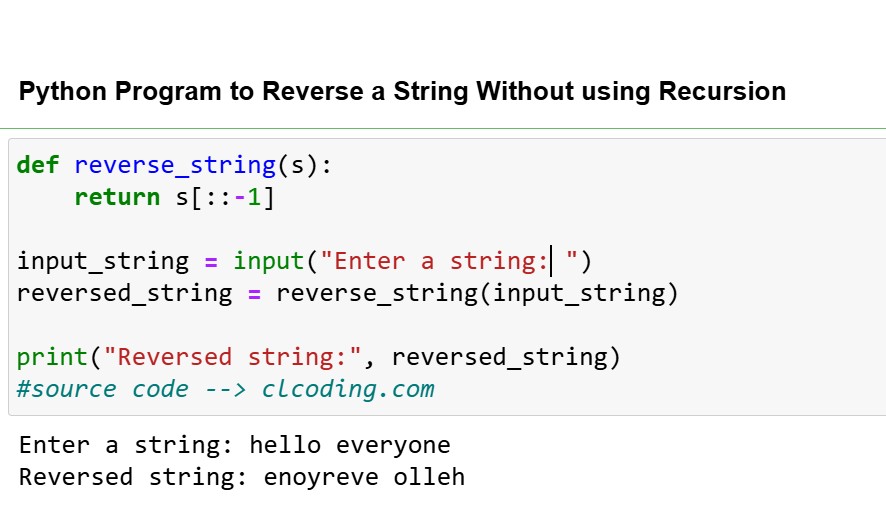
Day 69: Python Program to Reverse a String Without using Recursion


def reverse_string(s):

    return s[::-1]

input_string = input("Enter a string: ")

reversed_string = reverse_string(input_string)

print("Reversed string:", reversed_string)

#source code --> clcoding.com 

Code Explanation:

def reverse_string(s):
    return s[::-1]
This defines a function named reverse_string that takes one parameter, s (a string).
s[::-1]: This uses Python's slicing syntax to reverse the string:
s[start:end:step]: A slice of the string s is created with the given start, end, and step values.
:: without specifying start and end means to consider the entire string.
-1 as the step value means to traverse the string from the end to the beginning, effectively reversing it.
The reversed string is then returned by the function.

Getting User Input
input_string = input("Enter a string: ")
This prompts the user to enter a string.
The entered string is stored in the variable input_string.

Calling the Function
reversed_string = reverse_string(input_string)
The reverse_string function is called with input_string as the argument.
The reversed version of the string is returned by the function and stored in the variable reversed_string.

Printing the Result
print("Reversed string:", reversed_string)
This prints the reversed string to the console with the label "Reversed string:".

Python Coding challenge - Day 320| What is the output of the following Python Code?


Step-by-Step Explanation

Lambda Function Definition:

remainder is defined as a lambda function that takes two arguments, a and b.

The function calculates the remainder when a is divided by b using the modulo operator %.

The syntax for the modulo operation is:

a % b

This operation returns the remainder of the division of a by b.

Calling the Function:

The function remainder is called with a = 10 and b = 3.

Modulo Operation:

Inside the lambda function, the expression 10 % 3 is evaluated.

10 % 3 means "divide 10 by 3 and find the remainder."

When 10 is divided by 3, the quotient is 3 (since 3 * 3 = 9), and the remainder is 10 - 9 = 1.

Result Assignment:

The calculated remainder (1) is assigned to the variable result.

Printing the Result:

The print(result) statement outputs the value stored in result, which is 1.

Output

1

Python Coding challenge - Day 319| What is the output of the following Python Code?


Code Explanation:

Lambda Function Definition:

The function greater is defined using a lambda function.

The lambda function takes two arguments, a and b.

It uses a conditional expression (also called a ternary operator) to compare a and b. The structure is:

a if a > b else b

If a > b is True, the function returns a.

If a > b is False, the function returns b.

Calling the Function:

The function greater(8, 12) is called with a = 8 and b = 12.

Condition Evaluation:

Inside the lambda function, the condition a > b is evaluated, i.e., 8 > 12.

This condition is False because 8 is not greater than 12.

Returning the Result:

Since the condition a > b is False, the function returns b, which is 12.

Printing the Result:

The result 12 is stored in the variable result.

The print(result) statement outputs 12.

Output

12


Python Coding challenge - Day 318| What is the output of the following Python Code?


Code Explanation:

Function Definition:

is_positive is a lambda function that takes one argument, x.
It evaluates the condition x > 0 and returns True if x is greater than 0, and False otherwise.

Calling the Function:

The function is_positive is called with the argument -10.
Inside the lambda function, the condition -10 > 0 is evaluated.

Condition Evaluation:

The condition -10 > 0 is False because -10 is less than 0.

Assigning the Result:

The result of the condition (False) is stored in the variable result.

Printing the Result:

The print(result) statement outputs the value stored in result, which is False.

Output
False

Python Coding challenge - Day 317| What is the output of the following Python Code?


Code Explanation:

Function Definition:

multiply is defined as a lambda function that takes two arguments, a and b.
The function computes the product of a and b using the * operator.

Calling the Function:

The function multiply is called with the arguments 4 and 5.
Inside the lambda function, the expression 4 * 5 is evaluated, resulting in 20.

Assigning the Result:

The calculated value (20) is stored in the variable result.

Printing the Result:

The print(result) statement outputs the value stored in result, which is 20.

Output
20

Python Coding challenge - Day 316| What is the output of the following Python Code?


Code Explanation:

Function Definition:

add_numbers is a lambda function that takes two arguments, a and b.
It returns the sum of a and b.

Execution:

add_numbers(3, 7) is called with a = 3 and b = 7.
The lambda function calculates 3 + 7, which equals 10.

Print Statement:

print(result) outputs the result of the calculation, which is 10.

Output
10

Monday, 30 December 2024

Python Coding Challange - Question With Answer(01301224)


Step-by-Step Explanation:

  1. Assign x = 5:

    • The variable x is assigned the value 5.
  2. Assign y = (z := x ** 2) + 10:

    • The expression uses the walrus operator (:=) to:
      • Compute x ** 2 (the square of x), which is 5 ** 2 = 25.
      • Assign this value (25) to the variable z.
    • The entire expression (z := x ** 2) evaluates to 25, which is then added to 10.
    • So, y = 25 + 10 = 35.

    After this line:

      z = 25y = 35
  3. Print Statement:

    • The print function uses an f-string to display the values of x, y, and z:
      • {x=} outputs: x=5
      • {y=} outputs: y=35
      • {z=} outputs: z=25
  4. Output: The program prints:


    x=5 y=35 z=25

Key Points:

  • Walrus Operator (:=):

    • Assigns x ** 2 (25) to z and evaluates to 25 in the same expression.
    • This reduces the need for a separate assignment line for z.
  • Order of Operations:

    • First, z is assigned the value x ** 2 (25).
    • Then, y is computed as z + 10 (25 + 10 = 35).
  • Unrelated Variables:

    • x is not affected by the assignments to y or z. It remains 5 throughout.

Equivalent Code Without the Walrus Operator:

If we didn’t use the walrus operator, the code could be written as:


x = 5
z = x ** 2 y = z + 10print(f"{x=} {y=} {z=}")

This would produce the same output:

x=5 y=35 z=25

Why Use the Walrus Operator Here?

Using the walrus operator is helpful for:

  • Conciseness: It combines the assignment of z and the computation of y in one line.
  • Efficiency: It eliminates redundant code by directly assigning z during the computation.

Sunday, 29 December 2024

Day 66: Python Program to Replace All Occurrences of ‘a’ with $ in a String


def replace_a_with_dollar(input_string):

    result = input_string.replace('a', '$')

    return result

input_string = input("Enter a string: ")

output_string = replace_a_with_dollar(input_string)

print("Modified string:", output_string)

#source code --> clcoding.com

Code Explanation:

Function Definition:

def replace_a_with_dollar(input_string):
    result = input_string.replace('a', '$')
    return result
The function replace_a_with_dollar takes one parameter: input_string, which is expected to be a string.

Inside the function:
input_string.replace('a', '$') is called, which replaces every occurrence of the character 'a' in input_string with the character '$'.
The modified string is stored in the variable result.
The function returns the modified string (result).

User Input:
input_string = input("Enter a string: ")
The input() function prompts the user to enter a string. The entered string is stored in the variable input_string.

Function Call and Output:
output_string = replace_a_with_dollar(input_string)
print("Modified string:", output_string)
The replace_a_with_dollar function is called with input_string as the argument, and its result is assigned to output_string.
The modified string (output_string) is printed to the console.

Trend chart plot using Python


import matplotlib.pyplot as plt


years = [2014, 2016, 2018, 2020, 2022, 2024]

languages = ["Python", "JavaScript", "TypeScript", "Java", "C#"]

rankings = [

    [8, 6, 5, 3, 2, 1],  [1, 2, 2, 2, 3, 2],  

    [10, 9, 8, 5, 5, 3],  [2, 3, 3, 4, 4, 4],  

    [5, 4, 4, 6, 6, 5],  ]


colors = ["lime", "magenta", "purple", "orange", "cyan", ]


plt.figure(figsize=(10, 6))


for i, (language, ranking) in enumerate(zip(languages, rankings)):

    plt.plot(years, ranking, label=language, color=colors[i], linewidth=2)


plt.gca().invert_yaxis() 

plt.xticks(years, fontsize=10)

plt.yticks(range(1, 13), fontsize=10)

plt.title("Programming Language Trends (2014 - 2024)", fontsize=14)

plt.xlabel("Year", fontsize=12)

plt.ylabel("Rank", fontsize=12)

plt.legend(bbox_to_anchor=(1.05, 1), loc='upper left', fontsize=9)

plt.grid(color='gray', linestyle='--', linewidth=0.5, alpha=0.7)

plt.tight_layout()


plt.show()


Day 65 : Python Program to Remove the nth Index Character from a Non Empty String


def remove_nth_index_char(input_string, n):

    """

    Remove the character at the nth index from the input string.

Args:

        input_string (str): The string to process.

        n (int): The index of the character to remove.

Returns:

        str: A new string with the nth character removed.

    """

    if n < 0 or n >= len(input_string):

        raise ValueError("Index n is out of range.")

    return input_string[:n] + input_string[n+1:]

if __name__ == "__main__":

    input_string = input("Enter a non-empty string: ")

    try:

        n = int(input("Enter the index of the character to remove: "))

        result = remove_nth_index_char(input_string, n)

        print("String after removing the nth index character:", result)

    except ValueError as e:

        print("Error:", e)

#source code --> clcoding.com

Code Explanation:

Function: 
remove_nth_index_char
Purpose:
To return a new string where the character at the specified index n is removed.
Arguments:
input_string (str): The original string from which a character is to be removed.
n (int): The index of the character to remove.

Logic:
Index Validation:
if n < 0 or n >= len(input_string):
Checks if n is outside the valid range of indices for the string.
If n is negative or greater than or equal to the length of the string, it raises a ValueError with the message: "Index n is out of range."

String Manipulation:
input_string[:n]: Slices the string to include all characters before index n.
input_string[n+1:]: Slices the string to include all characters after index n.
input_string[:n] + input_string[n+1:]: Combines the two slices, effectively removing the character at index n.

Return Value:
A new string with the character at the nth index removed.

Main Script:
The if __name__ == "__main__": block allows this script to run only when executed directly, not when imported as a module.

Step-by-Step Execution:
Input:
Prompts the user to enter a non-empty string with input("Enter a non-empty string: ").
Prompts the user to specify the index (n) of the character they want to remove with int(input("Enter the index of the character to remove: ")).

Validation and Function Call:
The script calls remove_nth_index_char with the provided string and index.
If the index is invalid (e.g., out of range), a ValueError is raised, and the except block catches it.

Error Handling:
If an exception occurs (e.g., invalid index), it prints an error message: Error: Index n is out of range.
Output:
If the function executes successfully, it prints the new string with the character removed:
String after removing the nth index character: <new_string>

Python Coding Challange - Question With Answer(01291224)


Step-by-Step Explanation

  1. List Initialization:

    • my_list = [7, 2, 9, 4]
      This creates a list with the elements [7, 2, 9, 4] and assigns it to the variable my_list.
  2. Using the .sort() Method:

    • my_list.sort() sorts the list in place, meaning it modifies the original list directly and does not return a new list.
    • The .sort() method returns None, which is a special Python value indicating that no meaningful value was returned.

    So, when you assign the result of my_list.sort() back to my_list, you are overwriting the original list with None.

  3. Printing the Result:

    • print(my_list) will print None because the variable my_list now holds the return value of the .sort() method, which is None.

Popular Posts

Categories

100 Python Programs for Beginner (118) AI (152) Android (25) AngularJS (1) Api (6) Assembly Language (2) aws (27) Azure (8) BI (10) Books (251) Bootcamp (1) C (78) C# (12) C++ (83) Course (84) Coursera (298) Cybersecurity (28) Data Analysis (24) Data Analytics (16) data management (15) Data Science (217) Data Strucures (13) Deep Learning (68) Django (16) Downloads (3) edx (21) Engineering (15) Euron (30) Events (7) Excel (17) Finance (9) flask (3) flutter (1) FPL (17) Generative AI (47) Git (6) Google (47) Hadoop (3) HTML Quiz (1) HTML&CSS (48) IBM (41) IoT (3) IS (25) Java (99) Leet Code (4) Machine Learning (186) Meta (24) MICHIGAN (5) microsoft (9) Nvidia (8) Pandas (11) PHP (20) Projects (32) Python (1218) Python Coding Challenge (884) Python Quiz (343) Python Tips (5) Questions (2) R (72) React (7) Scripting (3) security (4) Selenium Webdriver (4) Software (19) SQL (45) Udemy (17) UX Research (1) web application (11) Web development (7) web scraping (3)

Followers

Python Coding for Kids ( Free Demo for Everyone)