
Tuesday, 3 May 2022
Day 27 : Pie Charts using Matplotlib in Python
Python Coding May 03, 2022 Python No comments
#!/usr/bin/env python
# coding: utf-8
# # Pie Charts using Matplotlib in Python
# In[2]:
#Pie Charts using Matplotlib in Python
import matplotlib.pyplot as pyplot
labels = ('Python', 'Java', 'Scala', 'C#')
sizes = [45, 30, 15, 10]
pyplot.pie(sizes,
labels=labels,
autopct='%1.f%%',
counterclock=False,
startangle=105)
# Display the figure
pyplot.show()
#clcoding.com
# In[ ]:
# In[ ]:
Day 26 : Real time Currency Converter with Python
Python Coding May 03, 2022 Python No comments
#!/usr/bin/env python
# coding: utf-8
# In[ ]:
pip install forex_python
# # Real-time Currency Converter with Python
# In[7]:
from forex_python.converter import CurrencyRates
c = CurrencyRates()
amount = int(input("Enter the amount: "))
from_currency = input("From Currency: ").upper()
to_currency = input("To Currency: ").upper()
print(from_currency, " To ", to_currency, amount)
result = c.convert(from_currency, to_currency, amount)
print(result)
#clcoding.com
# In[ ]:
Day 25 : Extract Text from PDF with Python
Python Coding May 03, 2022 Python No comments
Day 24 : Validate Anagrams using Python
Python Coding May 03, 2022 Python No comments
Day 23 : Contact Book in Python
Python Coding May 03, 2022 Python No comments
Day 22 : Pick a Random Card using Python
Python Coding May 03, 2022 Python No comments
#!/usr/bin/env python
# coding: utf-8
# # Pick a Random Card using Python
# In[8]:
import random
cards = ["Diamonds", "Spades", "Hearts", "Clubs"]
ranks = [2, 3, 4, 5, 6, 7, 8, 9, 10,
"Jack", "Queen", "King", "Ace"]
def pick_a_card():
card = random.choices(cards)
rank = random.choices(ranks)
return(f"The {rank} of {card}")
print(pick_a_card())
#clcoding.com
# In[ ]:
Day 21 : Fidget Spinner game with Python
Python Coding May 03, 2022 Python No comments
#!/usr/bin/env python
# coding: utf-8
# # Fidget Spinner game with Python
# In[7]:
from turtle import *
state = {'turn': 0}
def spinner():
clear()
angle = state['turn']/10
right(angle)
forward(100)
dot(120, 'cyan')
back(100)
right(120)
forward(100)
dot(120, 'green')
back(100)
right(120)
forward(100)
dot(120, 'blue')
back(100)
right(120)
update()
def animate():
if state['turn']>0:
state['turn']-=1
spinner() #clcoding.com
ontimer(animate, 20)
def flick():
state['turn']+=10
setup(420, 420, 370, 0)
hideturtle()
tracer(False)
width(20)
onkey(flick, 'space')
listen()
animate()
done()
# In[ ]:
# In[ ]:
Day 20 : Spelling Correction with Python
Python Coding May 03, 2022 Python No comments
Day 19 : Chessboard using Matplotlib in Python
Python Coding May 03, 2022 Python No comments
#!/usr/bin/env python
# coding: utf-8
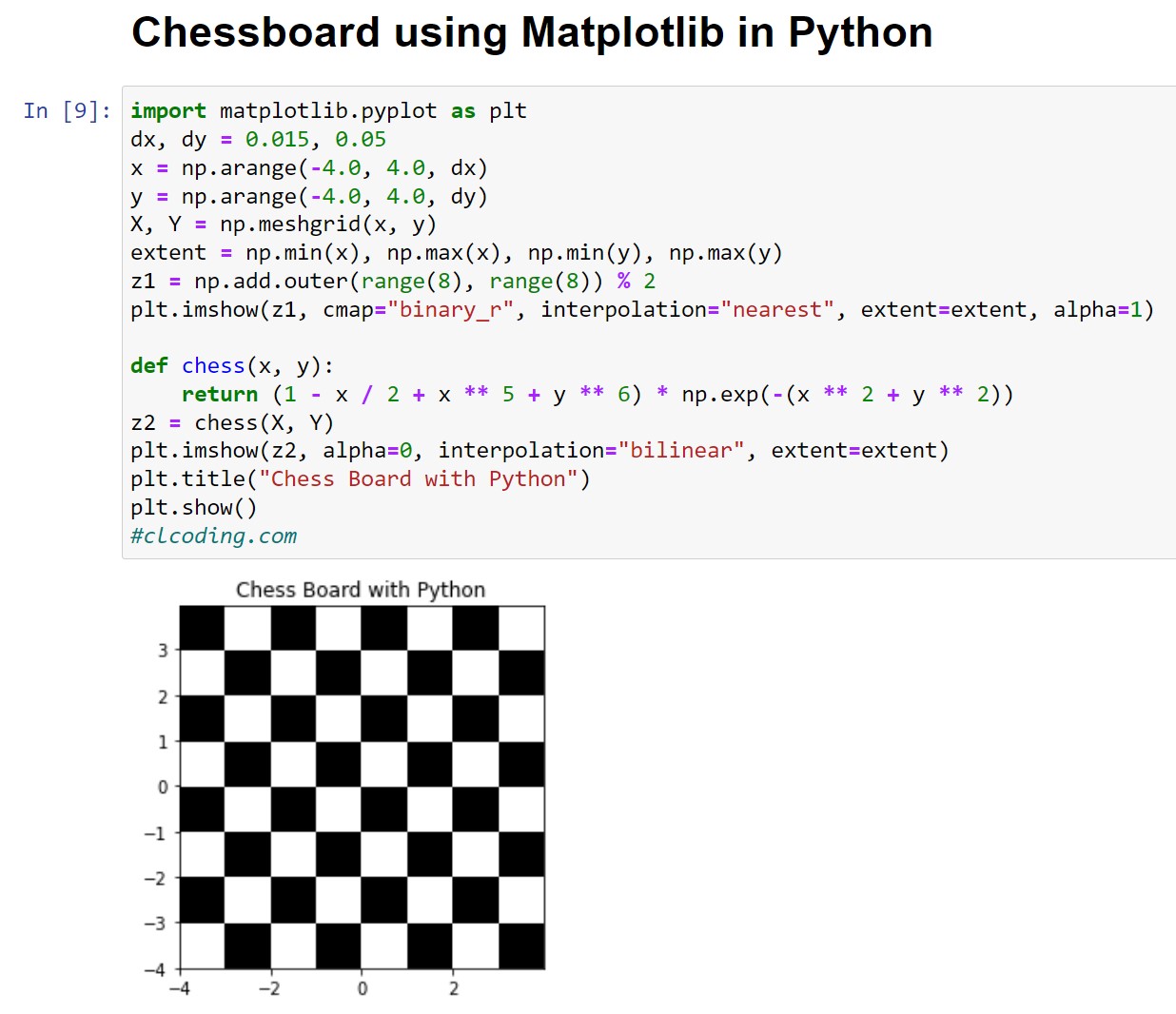
# # Chessboard using Matplotlib in Python
# In[17]:
import matplotlib.pyplot as plt
dx, dy = 0.015, 0.015
x = np.arange(-4.0, 4.0, dx)
y = np.arange(-4.0, 4.0, dy)
X, Y = np.meshgrid(x, y)
extent = np.min(x), np.max(x), np.min(y), np.max(y)
z1 = np.add.outer(range(8), range(8)) % 2
plt.imshow(z1, cmap="binary_r", interpolation="nearest", extent=extent, alpha=1)
def chess(x, y):
return (1 - x / 2 + x ** 5 + y ** 6) * np.exp(-(x ** 2 + y ** 2))
z2 = chess(X, Y)
plt.imshow(z2, alpha=0, interpolation="bilinear", extent=extent)
plt.title("Chess Board in Python")
plt.show()
#clcoding.com
# In[ ]:
Day 18 : Three Dimensional contour plots
Python Coding May 03, 2022 Python No comments
Popular Posts
-
Want to use Google Gemini Advanced AI — the powerful AI tool for writing, coding, research, and more — absolutely free for 12 months ? If y...
-
1. The Kaggle Book: Master Data Science Competitions with Machine Learning, GenAI, and LLMs This book is a hands-on guide for anyone who w...
-
๐ Introduction If you’re passionate about learning Python — one of the most powerful programming languages — you don’t need to spend a f...
-
Every data scientist, analyst, and business intelligence professional needs one foundational skill above almost all others: the ability to...
-
๐ Overview If you’ve ever searched for a rigorous and mathematically grounded introduction to data science and machine learning , then t...
-
Explanation: 1️⃣ Variable Initialization x = 1 A variable x is created. Its initial value is 1. This value will be updated repeatedly insi...
-
Code Explanation: 1. Defining the Class class Engine: A class named Engine is defined. 2. Defining the Method start def start(self): ...
-
Introduction AI and machine learning are no longer niche technologies — in life sciences and healthcare, they are becoming core capabiliti...
-
Code Explanation: 1. Defining the Class class Action: A class named Action is defined. This class will later behave like a function. 2. Def...
-
Code Explanation: 1. Defining a Custom Metaclass class Meta(type): Meta is a metaclass because it inherits from type. Metaclasses control ...





